Objective |
|
Transaction Code |
|
Tables |
MARA - General Material Data MAKT - Material Descriptions T006A - Assign Internal to Language-Dependent Unit |
Support |
1.Open SE38
2.Copy Program "YPRACTICE_201" to "YPRACTICE_202"
3.Change Program "YPRACTICE_202"
4.Open Goto > Attributes, and change Title with "202 - Display and Print List of Master Material"
5.Modified Report Declaration
Before
REPORT ypractice_201
NO STANDARD PAGE HEADING.
After
REPORT ypractice_202
NO STANDARD PAGE HEADING.
6.Add 2 global variable
DATA: gw_pri_params TYPE pri_params,
gv_valid TYPE c.
7.Modified "Input Screen/Selection"
Before
*----------------------------------------------------------------------*
*Input Screen/Selection
*----------------------------------------------------------------------*
SELECTION-SCREEN BEGIN OF BLOCK groupbox1 WITH FRAME TITLE text_101. "Declare Group Box 1
SELECTION-SCREEN BEGIN OF LINE.
SELECTION-SCREEN COMMENT 1(18) text_102 FOR FIELD so_matkl.
SELECT-OPTIONS so_matkl FOR mara-matkl.
SELECTION-SCREEN END OF LINE.
SELECTION-SCREEN BEGIN OF LINE.
SELECTION-SCREEN COMMENT 1(18) text_103 FOR FIELD so_matnr.
SELECT-OPTIONS so_matnr FOR mara-matnr.
SELECTION-SCREEN END OF LINE.
SELECTION-SCREEN END OF BLOCK groupbox1. "End Group Box 1
SELECTION-SCREEN BEGIN OF BLOCK groupbox2 WITH FRAME TITLE text_201. "Declare Group Box 2
SELECTION-SCREEN BEGIN OF LINE.
SELECTION-SCREEN COMMENT 1(18) text_202 FOR FIELD p_mwidth.
PARAMETERS p_mwidth TYPE n DEFAULT 113 LENGTH 4.
SELECTION-SCREEN END OF LINE.
SELECTION-SCREEN BEGIN OF LINE.
SELECTION-SCREEN COMMENT 1(18) text_203 FOR FIELD p_mline .
PARAMETERS p_mline TYPE n DEFAULT 30 LENGTH 4.
SELECTION-SCREEN END OF LINE.
SELECTION-SCREEN END OF BLOCK groupbox2. "End Group Box 2
After
*----------------------------------------------------------------------*
*Input Screen/Selection
*----------------------------------------------------------------------*
SELECTION-SCREEN BEGIN OF BLOCK groupbox1 WITH FRAME TITLE text_101. "Declare Group Box 1
SELECTION-SCREEN BEGIN OF LINE.
SELECTION-SCREEN COMMENT 1(18) text_102 FOR FIELD so_matkl.
SELECT-OPTIONS so_matkl FOR mara-matkl.
SELECTION-SCREEN END OF LINE.
SELECTION-SCREEN BEGIN OF LINE.
SELECTION-SCREEN COMMENT 1(18) text_103 FOR FIELD so_matnr.
SELECT-OPTIONS so_matnr FOR mara-matnr.
SELECTION-SCREEN END OF LINE.
SELECTION-SCREEN END OF BLOCK groupbox1. "End Group Box 1
SELECTION-SCREEN BEGIN OF BLOCK groupbox2 WITH FRAME TITLE text_201. "Declare Group Box 2
SELECTION-SCREEN BEGIN OF LINE.
SELECTION-SCREEN COMMENT 1(18) text_202 FOR FIELD p_mwidth.
PARAMETERS p_mwidth TYPE n DEFAULT 113 LENGTH 4.
SELECTION-SCREEN END OF LINE.
SELECTION-SCREEN BEGIN OF LINE.
SELECTION-SCREEN COMMENT 1(18) text_203 FOR FIELD p_mline .
PARAMETERS p_mline TYPE n DEFAULT 30 LENGTH 4.
SELECTION-SCREEN END OF LINE.
SELECTION-SCREEN END OF BLOCK groupbox2. "End Group Box 2
SELECTION-SCREEN BEGIN OF BLOCK groupbox3 WITH FRAME TITLE text_301. "Declare Group Box 3 - Print Parameter
SELECTION-SCREEN BEGIN OF LINE.
SELECTION-SCREEN COMMENT 1(18) text_311.
PARAMETERS: p_pdest LIKE pri_params-pdest DEFAULT 'LOCL'.
SELECTION-SCREEN END OF LINE.
SELECTION-SCREEN BEGIN OF LINE.
SELECTION-SCREEN COMMENT 1(18) text_312.
PARAMETERS p_paart LIKE pri_params-paart DEFAULT 'X_44_120'.
SELECTION-SCREEN END OF LINE.
SELECTION-SCREEN BEGIN OF LINE.
SELECTION-SCREEN COMMENT 1(18) text_313.
PARAMETERS p_dialog TYPE c AS CHECKBOX DEFAULT 'X'.
SELECTION-SCREEN COMMENT 23(25) text_314 FOR FIELD p_dialog.
SELECTION-SCREEN END OF LINE.
SELECTION-SCREEN ULINE.
SELECTION-SCREEN BEGIN OF LINE.
SELECTION-SCREEN COMMENT 1(18) text_321.
PARAMETERS p_prv RADIOBUTTON GROUP rad1 VISIBLE LENGTH 20.
SELECTION-SCREEN COMMENT 23(8) text_322 FOR FIELD p_prv.
PARAMETERS p_prt RADIOBUTTON GROUP rad1 DEFAULT 'X'.
SELECTION-SCREEN COMMENT 34(8) text_323 FOR FIELD p_prt.
SELECTION-SCREEN END OF LINE.
SELECTION-SCREEN END OF BLOCK groupbox3. "End Group Box 3
8.Add new text in "EVENT"
text_301 = 'Print Setup'.
text_311 = 'Output Device'.
text_312 = 'Printer Layout'.
text_313 = ' '.
text_314 = 'Show Printer Dialog'.
text_321 = 'Print Option'.
text_322 = 'Preview'.
text_323 = 'Print'.
9.Modified
Before
*======================================================================*
*MAIN PROGRAM
*Execute after Input Screen
*======================================================================*
START-OF-SELECTION.
NEW-PAGE LINE-SIZE p_mwidth.
NEW-PAGE LINE-COUNT p_mline.
PERFORM fm_collect_data.
PERFORM fm_process_data.
PERFORM fm_display_data.
END-OF-SELECTION.
After
*======================================================================*
*MAIN PROGRAM
*Execute after Input Screen
*======================================================================*
START-OF-SELECTION.
FORMAT RESET.
NEW-PAGE LINE-SIZE p_mwidth.
NEW-PAGE LINE-COUNT p_mline.
PERFORM fm_collect_data.
PERFORM fm_process_data.
IF LINES( gi_header ) > 0.
IF p_prt = 'X'.
PERFORM fm_print_setup.
ENDIF.
PERFORM fm_display_data.
ELSE.
PERFORM fm_showmessage.
ENDIF.
END-OF-SELECTION.
10.Create new 2 sub routine, "fm_print_setup" and "fm_showmessage"
*&--------------------------------------------------------------------*
*& Form fm_print_setup
*&--------------------------------------------------------------------*
* text
*---------------------------------------------------------------------*
FORM fm_print_setup.
DATA: lv_dialog TYPE c.
IF p_prt = 'X'.
IF p_dialog = 'X'.
lv_dialog = ' '.
ELSE.
lv_dialog = 'X'.
ENDIF.
CALL FUNCTION 'GET_PRINT_PARAMETERS'
EXPORTING
destination = p_pdest
immediately = 'X'
draft = ' '
no_dialog = lv_dialog
release = 'X'
layout = p_paart
IMPORTING
out_parameters = gw_pri_params
valid = gv_valid
EXCEPTIONS
archive_info_not_found = 1
invalid_print_params = 2
invalid_archive_params = 3
OTHERS = 4.
* Dot Matrix Setting
* PRINT-CONTROL CPI 17. "CPI cpiLetters per inch
* PRINT-CONTROL LPI 6. "LPI lpiLines per inch
*__________________________________________________
IF sy-subrc <> 0.
MESSAGE ID sy-msgid TYPE sy-msgty NUMBER sy-msgno
WITH sy-msgv1 sy-msgv2 sy-msgv3 sy-msgv4.
ENDIF.
CHECK gv_valid = 'X'.
NEW-PAGE PRINT ON PARAMETERS gw_pri_params NO DIALOG.
ENDIF.
ENDFORM. "fm_print_setup
*&--------------------------------------------------------------------*
*& Form fm_showmessage
*&--------------------------------------------------------------------*
* text
*---------------------------------------------------------------------*
FORM fm_showmessage.
MESSAGE 'File not found.' TYPE 'I'.
ENDFORM. "fm_showmessage
11.Activated and run
13.Finished
▪Input Selection

▪Output
Start Printing without Preview
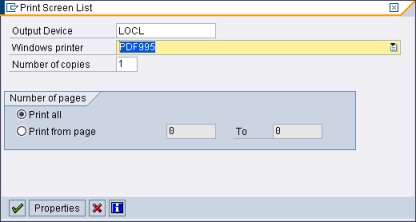
Test Printing to PDF Writer
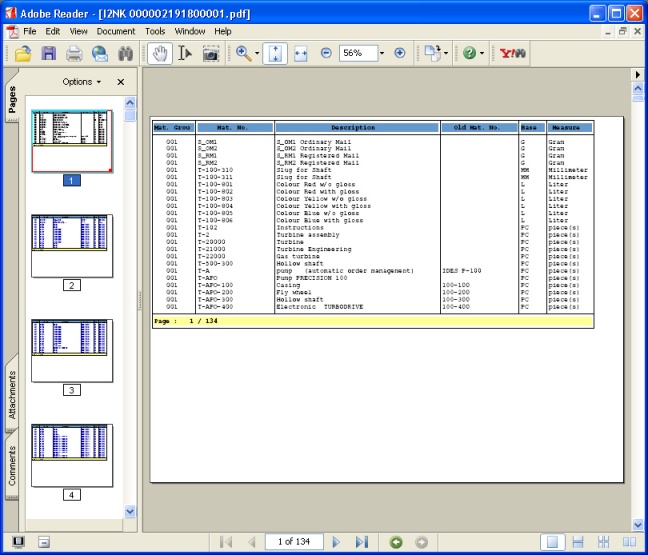
Congratulation "Now, you have report template for Display Output"
We will show you how used this abap code as a template for another report.
Start create another report : Report (203)