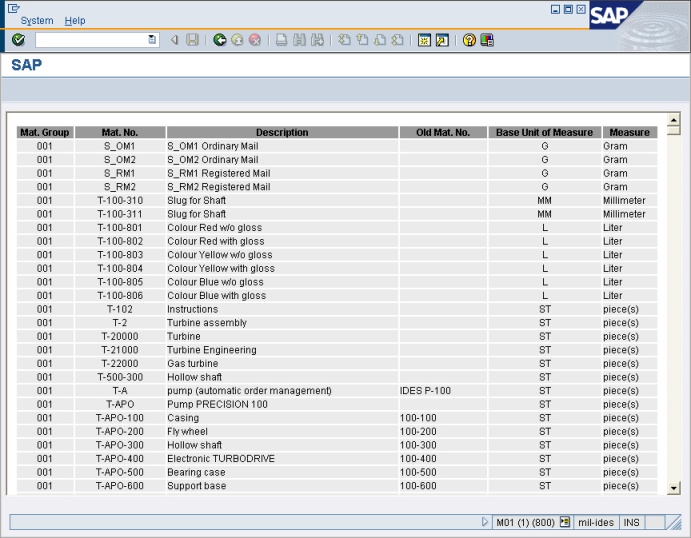
Objective |
|
Transaction Code |
|
Tables |
MARA - General Material Data MAKT - Material Descriptions T006A - Assign Internal to Language-Dependent Unit |
Support |
1.Open SE38
2.Copy Program "YPRACTICE_101" to "YPRACTICE_301"
3.Change Program "YPRACTICE_301"
4.Open Goto > Attributes, and change Title with "301 - Display List of Master Material"
5.Modified Report Declaration
Before
REPORT ypractice_101.
After
REPORT ypractice_301.
6.Add New Screen for displaying Html Report
▪Click " ▪Right click on Object Tree
▪Enter screen number "2000" and then press "
▪Fill short description "Html Report" ▪Click " ▪Click " ▪Select "CC_REPORT_DISPLAY", after that click " ▪Set the component like this screen bellow
▪Click " ▪Close design layout and back to previous screen ▪Click "Element List" tab ▪Fill on the blank cell with "OK_CODE"
▪Double click " |
 " to show all object

 " to start design layout
 " to add "Custom Control" component to screen and fill the Custom Control name with "CC_REPORT_DISPLAY"
 " (Attribute Windows)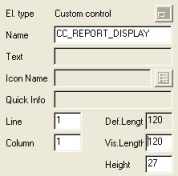
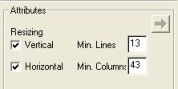

 " and back to Source Code
7.Remove DEFINE macro_data_possition.
8.Add new global variable
DATA: ok_code LIKE sy-ucomm,
save_ok TYPE sy-ucomm.
* Html Report Required
TYPES: BEGIN OF gy_html_code,
line_code(1000),
END OF gy_html_code.
DATA: gi_html_code TYPE TABLE OF gy_html_code WITH HEADER LINE.
DATA: cc_report_display TYPE REF TO cl_gui_html_viewer,
web_container TYPE REF TO cl_gui_custom_container.
DEFINE write_code1.
clear gi_html_code.
gi_html_code-line_code = &1.
append gi_html_code.
END-OF-DEFINITION.
DEFINE write_code2.
clear gi_html_code.
concatenate &1 &2 into gi_html_code-line_code.
append gi_html_code.
END-OF-DEFINITION.
DEFINE write_code3.
clear gi_html_code.
concatenate &1 &2 &3 into gi_html_code-line_code.
append gi_html_code.
END-OF-DEFINITION.
9.Modified "Input Screen/Selection"
Before
*----------------------------------------------------------------------*
*Input Screen/Selection
*----------------------------------------------------------------------*
SELECT-OPTIONS so_matkl FOR mara-matkl.
SELECT-OPTIONS so_matnr FOR mara-matnr.
After
*----------------------------------------------------------------------*
*Input Screen/Selection
*----------------------------------------------------------------------*
SELECTION-SCREEN BEGIN OF BLOCK groupbox1 WITH FRAME TITLE text_101. "Declare Group Box 1
SELECTION-SCREEN BEGIN OF LINE.
SELECTION-SCREEN COMMENT 1(14) text_102 FOR FIELD so_matkl.
SELECT-OPTIONS so_matkl FOR mara-matkl OBLIGATORY DEFAULT '001'.
SELECTION-SCREEN END OF LINE.
SELECTION-SCREEN BEGIN OF LINE.
SELECTION-SCREEN COMMENT 1(14) text_103 FOR FIELD so_matnr.
SELECT-OPTIONS so_matnr FOR mara-matnr.
SELECTION-SCREEN END OF LINE.
SELECTION-SCREEN END OF BLOCK groupbox1. "End Group Box 1
SELECTION-SCREEN BEGIN OF BLOCK groupbox2 WITH FRAME TITLE text_201. "Declare Group Box 2
SELECTION-SCREEN BEGIN OF LINE.
SELECTION-SCREEN COMMENT 1(18) text_202 FOR FIELD p_fname.
PARAMETERS p_fname LIKE rlgrap-filename OBLIGATORY DEFAULT 'C:\abap_report_01.html'.
SELECTION-SCREEN END OF LINE.
SELECTION-SCREEN END OF BLOCK groupbox2. "End Group Box 2
10.Create new subroutine "fm_initialization"
*&--------------------------------------------------------------------*
*& Form fm_initialization
*&--------------------------------------------------------------------*
* text
*---------------------------------------------------------------------*
FORM fm_initialization.
IF cc_report_display IS INITIAL.
CREATE OBJECT web_container
EXPORTING
container_name = 'CC_REPORT_DISPLAY'.
CREATE OBJECT cc_report_display
EXPORTING
parent = web_container.
IF sy-subrc NE 0.
*
ENDIF.
ENDIF.
ENDFORM. "fm_initialization
11.Create initialization code, write it after Input Screen Block
*----------------------------------------------------------------------*
*INITIALIZATION
*----------------------------------------------------------------------*
INITIALIZATION.
text_101 = 'Selection Parameter'.
text_102 = 'Material Group'.
text_103 = 'Material Number'.
text_201 = 'Save Html File'.
text_202 = 'File Location'.
PERFORM fm_initialization.
12.Create new subroutine "fm_create_css"
*&--------------------------------------------------------------------*
*& Form fm_create_css
*&--------------------------------------------------------------------*
* text
*---------------------------------------------------------------------*
* -->FV_CSS text
*---------------------------------------------------------------------*
FORM fm_create_css.
write_code1 '<style type="text/css">'.
write_code1 '<!--'.
write_code1 '.styleHeader {'.
write_code1 ' font-family: Arial, Helvetica, sans-serif;'.
write_code1 ' font-size: 12px;'.
write_code1 ' font-weight: bold;'.
write_code1 ' text-align: center;'.
write_code1 ' }'.
write_code1 '.style1 {'.
write_code1 ' font-family: Arial, Helvetica, sans-serif;'.
write_code1 ' font-size: 12px;'.
write_code1 ' text-align: center;'.
write_code1 ' }'.
write_code1 '.style2 {'.
write_code1 ' font-family: Arial, Helvetica, sans-serif;'.
write_code1 ' font-size: 12px;'.
write_code1 ' text-align: left;'.
write_code1 ' }'.
write_code1 '-->'.
write_code1 '</style>'.
ENDFORM. "fm_create_css
13.Create new subroutine "fm_create_html_file"
*&--------------------------------------------------------------------*
*& Form fm_create_temp_html
*&--------------------------------------------------------------------*
* text
*---------------------------------------------------------------------*
* -->FI_FILE text
* -->FV_URL text
*---------------------------------------------------------------------*
FORM fm_create_html_file TABLES fi_file STRUCTURE gi_html_code USING fv_url.
CONDENSE fv_url NO-GAPS.
CALL FUNCTION 'WS_DOWNLOAD'
EXPORTING
filename = fv_url
filetype = 'ASC'
TABLES
data_tab = fi_file
EXCEPTIONS
file_open_error = 1
file_write_error = 2
invalid_filesize = 3
invalid_table_width = 4
invalid_type = 5
no_batch = 6
unknown_error = 7
OTHERS = 8.
ENDFORM. "fm_create_temp_html
14.Create new subroutine "fm_load_html"
*&--------------------------------------------------------------------*
*& Form fm_load_html
*&--------------------------------------------------------------------*
* text
*---------------------------------------------------------------------*
* -->URL text
*---------------------------------------------------------------------*
FORM fm_load_html USING fv_url.
CALL METHOD cc_report_display->show_url
EXPORTING
url = fv_url.
ENDFORM. "fm_load_html
15.Modified subroutine "fm_display_data"
Before
*&--------------------------------------------------------------------*
*& Form fm_display_data
*&--------------------------------------------------------------------*
* text
*---------------------------------------------------------------------*
FORM fm_display_data.
* Create Header Text
ULINE AT (gv_width). " Upper frame border
FORMAT COLOR COL_HEADING INTENSIFIED. " Title color
macro_data_possition : 'HEADER' 'Mat. Group' 'Mat. No.' 'Description' 'Old Mat. No.' 'Base Unit' 'Measure'.
WRITE: AT gv_width sy-vline. " Right border
ULINE AT (gv_width). " Line below titles
FORMAT COLOR OFF.
* Display Data to Screen
LOOP AT gi_header.
macro_data_possition : 'CONTENT'
gi_header-matkl
gi_header-matnr
gi_header-maktx
gi_header-bismt
gi_header-meins
gi_header-mseht.
ENDLOOP.
* End of Line
ULINE AT (gv_width). " Line below last data
ENDFORM. "fm_display_data
After
*&--------------------------------------------------------------------*
*& Form fm_display_data
*&--------------------------------------------------------------------*
* text
*---------------------------------------------------------------------*
FORM fm_display_data.
REFRESH gi_html_code.
PERFORM fm_create_css.
write_code1 '<body>'.
write_code1 '<table width="100%" border="0" cellspacing="2" cellpadding="0">'.
* Create Header Text
write_code1 ' <tr bgcolor="#999999" class="styleHeader">'.
write_code1 ' <td>Mat. Group</td>'.
write_code1 ' <td>Mat. No.</td>'.
write_code1 ' <td>Description</td>'.
write_code1 ' <td>Old Mat. No.</td>'.
write_code1 ' <td>Base Unit of Measure</td>'.
write_code1 ' <td>Measure</td>'.
write_code1 ' </tr>'.
* Display Data to Screen
LOOP AT gi_header.
write_code1 ' <tr bgcolor="#EBEBEB">'.
write_code3 ' <td class="style1">' gi_header-matkl '</td>'.
write_code3 ' <td class="style1">' gi_header-matnr '</td>'.
write_code3 ' <td class="style2">' gi_header-maktx '</td>'.
write_code3 ' <td class="style2">' gi_header-bismt '</td>'.
write_code3 ' <td class="style1">' gi_header-meins '</td>'.
write_code3 ' <td class="style2">' gi_header-mseht '</td>'.
write_code1 ' </tr>'.
ENDLOOP.
* End of Line
write_code1 '</table>'.
write_code1 '</body>'.
PERFORM fm_create_html_file TABLES gi_html_code USING p_fname.
PERFORM fm_load_html USING p_fname.
CALL SCREEN 2000.
ENDFORM. "fm_display_data
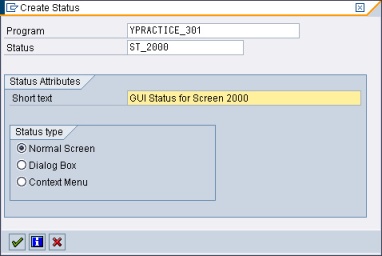
16.Add new GUI Status for Screen 2000
▪Right Click on Object Tree
▪Fill Status with "ST_2000" and Short Text with "GUI Status for Screen 2000"
▪Click " ▪Open Function Key ▪Choose Standard Toolbar and enter BACK on icon number 3 from the left
▪Click " ▪Double click " |


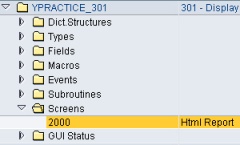
17.Double Click Screen 2000 on Object Tree
18.Modified Screen 2000 Flow Logic
Before
PROCESS BEFORE OUTPUT.
* MODULE STATUS_2000.
*
PROCESS AFTER INPUT.
* MODULE USER_COMMAND_2000.
After
PROCESS BEFORE OUTPUT.
MODULE STATUS_2000.
*
PROCESS AFTER INPUT.
MODULE USER_COMMAND_2000.
19.Click " " to save Screen 2000
20.Double click on text "STATUS_2000"
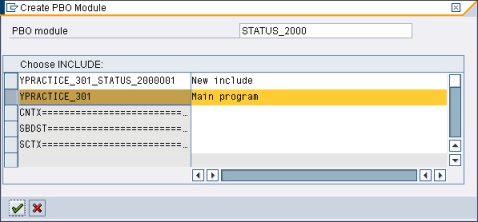
21.Select "YPRACTICE_301" and Click " " to create new module STATUS_2000
22.Modified module "STATUS_2000 output"
Before
*&---------------------------------------------------------------------*
*& Module STATUS_2000 OUTPUT
*&---------------------------------------------------------------------*
* text
*----------------------------------------------------------------------*
module STATUS_2000 output.
* SET PF-STATUS 'xxxxxxxx'.
* SET TITLEBAR 'xxx'.
endmodule. " STATUS_2000 OUTPUT
After
*&---------------------------------------------------------------------*
*& Module STATUS_2000 OUTPUT
*&---------------------------------------------------------------------*
* text
*----------------------------------------------------------------------*
module STATUS_2000 output.
SET PF-STATUS 'ST_2000'.
* SET TITLEBAR 'xxx'.
endmodule. " STATUS_2000 OUTPUT
23.Back to Screen 2000 Flow Logic
24.Double click on text "USER_COMMAND_2000"
25.Select "YPRACTICE_301" and Click "" to create new module USER_COMMAND_2000

26.Modified module "USER_COMMAND_2000 input"
Before
*&---------------------------------------------------------------------*
*& Module USER_COMMAND_2000 INPUT
*&---------------------------------------------------------------------*
* text
*----------------------------------------------------------------------*
module USER_COMMAND_2000 input.
endmodule. " USER_COMMAND_2000 INPUT
After
*&---------------------------------------------------------------------*
*& Module USER_COMMAND_2000 INPUT
*&---------------------------------------------------------------------*
* text
*----------------------------------------------------------------------*
MODULE user_command_2000 INPUT.
save_ok = ok_code.
CLEAR ok_code.
CASE save_ok.
WHEN 'BACK'.
LEAVE TO SCREEN 0.
WHEN OTHERS.
ENDCASE.
CLEAR ok_code.
ENDMODULE. " USER_COMMAND_2000 INPUT
27.Click "" and click " "
"
28.Select "REPS", "CUAD" and "DYNP"
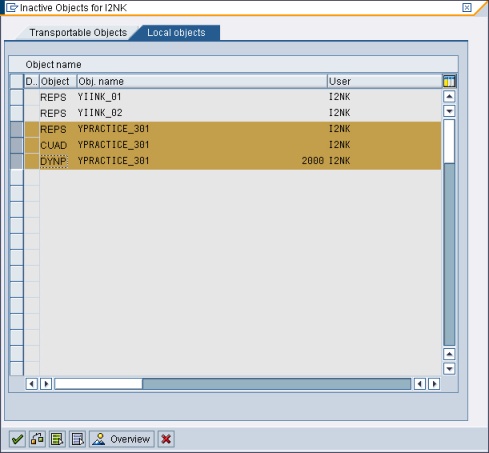
29.Click "" to activate the program
30.Test and Run program
32.Finished
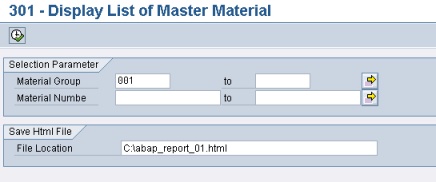
▪Input Selection
▪Output