Objective |
|
Transaction Code |
|
Tables |
MARA - General Material Data MAKT - Material Descriptions T006A - Assign Internal to Language-Dependent Unit |
Support |
1.Open SE38
2.Copy Program "YPRACTICE_101" to "YPRACTICE_501"
3.Change Program "YPRACTICE_501"
4.Open Goto > Attributes, and change Title with "501 - Display List of Master Material"
5.Modification Report Declaration
Before
REPORT ypractice_101.
After
REPORT ypractice_501 .
6.Click " "
"
7.Add New Include Program
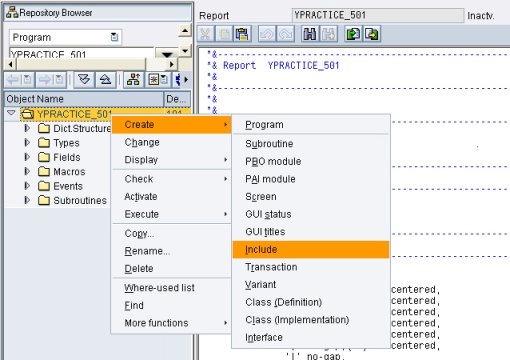
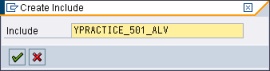
8.Fill include name with "YPRACTICE_501_ALV" and then click " "
"
9.Click " " to create new Include
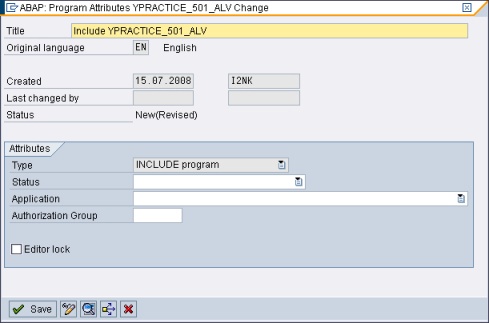
10.Save into same package with "YPRACTICE_501" and then click "" to insert the include into main program
11.Insert the source code from page of "YPRACTICE_501_ALV" into the include program
12.Open new session of SE38, by pressing '/oSE38' then enter at the command field
13.Fill Program name with "SAPLKKBL"
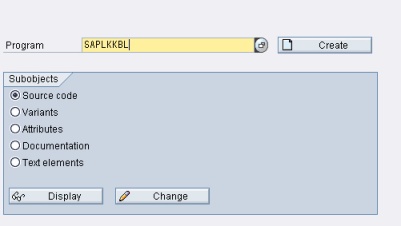
14.Click " " to display the program
15.Click ""
16.Open GUI Status tree menu
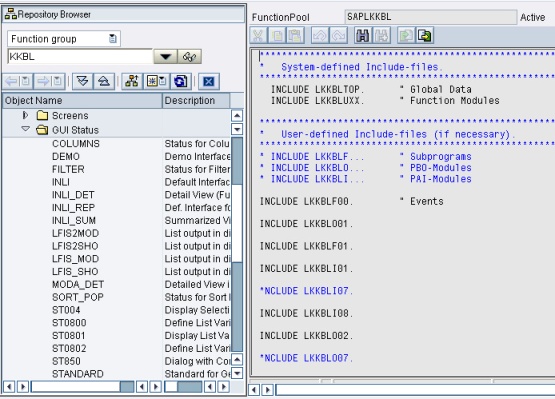
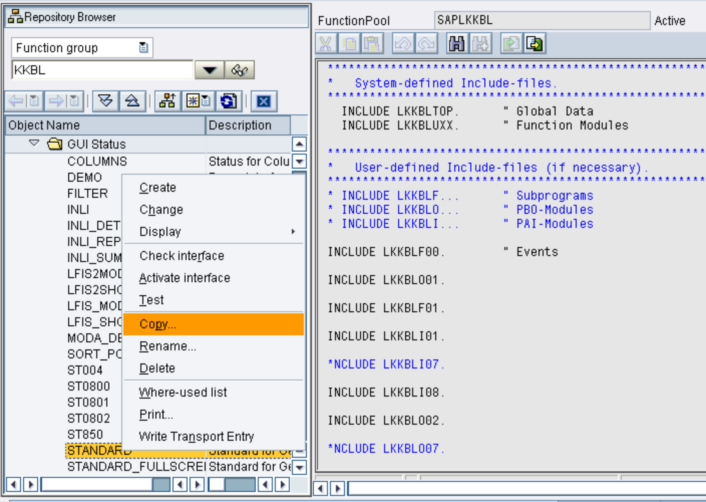
17.Copy GUI Status of "Standard"
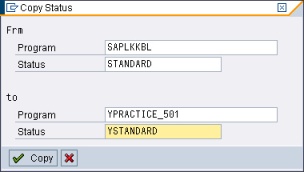
18.Fill Program with "YPRACTICE_501" and Status with "YSTANDARD"
19.Click " "
"
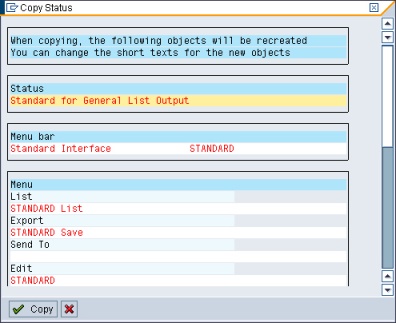
20.Don't change anything, just click "" again
21.Back to program "YPRACTICE_501" and start writing source code
22.Remove "DATA: gv_width TYPE i. " Width of list"
23.Modified "Input Screen/Selection"
Before
*----------------------------------------------------------------------*
*Input Screen/Selection
*----------------------------------------------------------------------*
SELECT-OPTIONS so_matkl FOR mara-matkl.
SELECT-OPTIONS so_matnr FOR mara-matnr.
After
*----------------------------------------------------------------------*
*Input Screen/Selection
*----------------------------------------------------------------------*
SELECTION-SCREEN BEGIN OF BLOCK groupbox1 WITH FRAME TITLE text_101. "Declare Group Box 1
SELECTION-SCREEN BEGIN OF LINE.
SELECTION-SCREEN COMMENT 1(18) text_102 FOR FIELD so_matkl.
SELECT-OPTIONS so_matkl FOR mara-matkl.
SELECTION-SCREEN END OF LINE.
SELECTION-SCREEN BEGIN OF LINE.
SELECTION-SCREEN COMMENT 1(18) text_103 FOR FIELD so_matnr.
SELECT-OPTIONS so_matnr FOR mara-matnr.
SELECTION-SCREEN END OF LINE.
SELECTION-SCREEN END OF BLOCK groupbox1. "End Group Box 1
SELECTION-SCREEN BEGIN OF BLOCK groupbox2 WITH FRAME TITLE text_201. "Declare Group Box 2
SELECTION-SCREEN BEGIN OF LINE.
SELECTION-SCREEN COMMENT 1(18) text_202 FOR FIELD p_mwidth.
PARAMETERS p_mwidth TYPE n DEFAULT 113 LENGTH 4.
SELECTION-SCREEN END OF LINE.
SELECTION-SCREEN BEGIN OF LINE.
SELECTION-SCREEN COMMENT 1(18) text_203 FOR FIELD p_mline .
PARAMETERS p_mline TYPE n DEFAULT 30 LENGTH 4.
SELECTION-SCREEN END OF LINE.
SELECTION-SCREEN END OF BLOCK groupbox2. "End Group Box 2
24.Create initialization code, write it after Input Screen Block
*----------------------------------------------------------------------*
*INITIALIZATION
*----------------------------------------------------------------------*
INITIALIZATION.
text_101 = 'Selection Parameter'.
text_102 = 'Material Group'.
text_103 = 'Material Number'.
text_201 = 'Page Setup'.
text_202 = 'Max. Width'.
text_203 = 'Max. Line per Page'.
25.Move "INCLUDE ypractice_501_alv." to the top of source code
*----------------------------------------------------------------------*
* Tables
*----------------------------------------------------------------------*
TABLES : mara, makt, t006a.
INCLUDE ypractice_501_alv.
*----------------------------------------------------------------------*
*GLOBAL VARIABLE DECRALATION
*----------------------------------------------------------------------*
TYPES: BEGIN OF ty_header,
...
26.Modified sub routine "fm_display_data"
Before
*&--------------------------------------------------------------------*
*& Form fm_display_data
*&--------------------------------------------------------------------*
* text
*---------------------------------------------------------------------*
FORM fm_display_data.
* Create Header Text
ULINE AT (gv_width). " Upper frame border
FORMAT COLOR COL_HEADING INTENSIFIED. " Title color
macro_data_possition : 'HEADER' 'Mat. Group' 'Mat. No.' 'Description' 'Old Mat. No.' 'Base Unit' 'Measure'.
WRITE: AT gv_width sy-vline. " Right border
ULINE AT (gv_width). " Line below titles
FORMAT COLOR OFF.
* Display Data to Screen
LOOP AT gi_header.
macro_data_possition : 'CONTENT'
gi_header-matkl
gi_header-matnr
gi_header-maktx
gi_header-bismt
gi_header-meins
gi_header-mseht.
ENDLOOP.
* End of Line
ULINE AT (gv_width). " Line below last data
ENDFORM. "fm_display_data
After
*&--------------------------------------------------------------------*
*& Form fm_display_data
*&--------------------------------------------------------------------*
* text
*---------------------------------------------------------------------*
FORM fm_display_data.
PERFORM fm_alv_reset_data.
* Set ALV Parameters and Data
PERFORM fm_alv_set_layout USING 'Display List of Master Material'.
PERFORM fm_alv_set_print.
PERFORM FM_ALV_SET_COLUMN.
GV_I_DEFAULT = 'X'.
GV_I_SAVE = 'A'.
PERFORM FM_ALV_SHOW TABLES GI_HEADER.
ENDFORM. "fm_display_data
27.Create new sub routine, "fm_alv_set_column" at the bottom of source code
*&--------------------------------------------------------------------*
*& Form fm_alv_set_column
*&--------------------------------------------------------------------*
* text
*---------------------------------------------------------------------*
FORM fm_alv_set_column.
* matkl LIKE mara-matkl, " Material Group
* matnr LIKE mara-matnr, " Material Number
* maktx LIKE makt-maktx, " Material Description
* bismt LIKE mara-bismt, " Old material number
* meins LIKE mara-meins, " Base Unit of Measure
* mseht LIKE t006a-mseht, " Unit of Measurement Text
* Displaying Column by Fieldname
perform fm_alv_add_fieldcat using :
'MATKL' 'MARA' 'MATKL' '' '' 'Mat. Group' '' '' '' '' '' '' '' '' '' '' '' '' '' 'X' 'X',
'MATNR' 'MARA' 'MATNR' '' '' 'Mat. Number' '' '' '' '' '' '' '' '' '' '' '' '' '' 'X' 'X',
'MAKTX' 'MAKT' 'MAKTX' '' '' 'Decription' '' '' '' '' '' '' '' '' '' '' '' '' '' '' '',
'BISMT' 'MARA' 'BISMT' '' '' 'Old Mat. No' '' '' '' '' '' '' '' '' '' '' '' '' '' '' '',
'MEINS' 'MARA' 'MEINS' '' '' 'Base Unit' '' '' '' '' '' '' '' '' '' '' '' '' '' '' '',
'MSEHT' 'T006A' 'MSEHT' '' '' 'Measure' '' '' '' '' '' '' '' '' '' '' '' '' '' '' ''.
* Sort and Group by Field
* CLEAR gi_it_sort.
* gi_it_sort-fieldname = 'WERKS'. ">> Filled by Fieldname
* gi_it_sort-up = 'X'. ">> 'X' = Ascending ; ' ' = Descending
* gi_it_sort-subtot = 'X'.
* gi_it_sort-group = '*'. ">> '*' = Grouped by field ; ' ' = Not grouped by this field
* APPEND gi_it_sort.
ENDFORM. "fm_alv_set_column
28.Activated and run
30.Finished
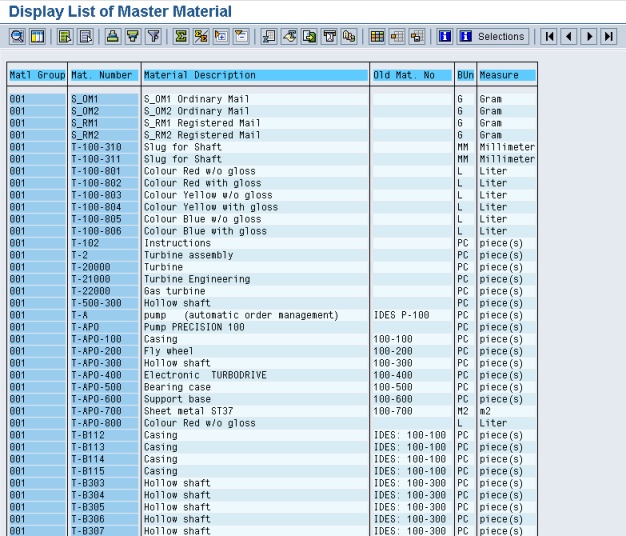
▪Input Selection
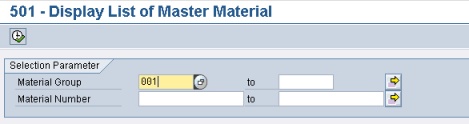
▪Output