Objective |
▪Call Method "ycl_report_mm=>get_data" |
Transaction Code |
|
Tables |
MARA - General Material Data |
Support |
|
Contributors |
Danar Andri Prasetyo ( danaruto131@yahoo.com ) |
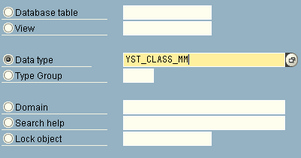
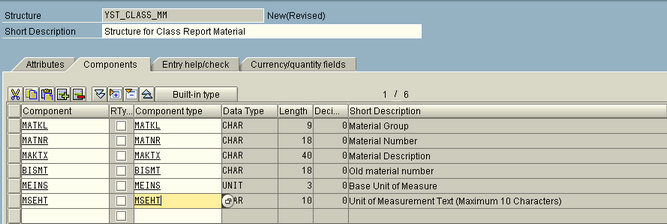
1.First, we have to create structure "YST_CLASS_MM" by t-code SE11.
Display Steps sdasjdkl
•Click •Choose Structure
•Fill Short Description with "Structure for Class Report Material" •Fill Tab "Component" like picture below
•Save and Activate |

 then click
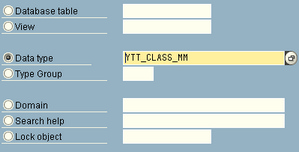
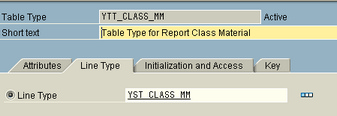
2.Second, we make table type "YTT_CLASS_MM" by t-code SE11.
•Click •Choose Table Type
•Fill Short Description with "Table Type for Report Class Material" •Click Line Type then fill with name of structure which created. See picture below
•Save and Activate |

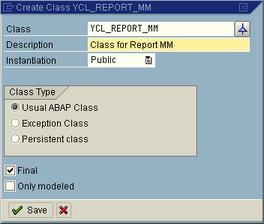
3.Create Class "YCL_REPORT_MM" By t-code SE24.
•Click •Fill Description like picture below
•Click •Create new method "GET_DATA" fill Componennt Like picture below
•Create parameter by clicking tab parameters •Fill fields like picture below
•Save and Activate •Back to Tab Method by clicking •Now, we enter to script field then we write script code, put script between "method GET_DATA." and " •endmethod." •Define variabel that we need DATA : lw_header TYPE YST_CLASS_MM, lv_counter TYPE i. •Select Data from table *Collect Master Material SELECT matnr matkl bismt meins INTO CORRESPONDING FIELDS OF TABLE DATA FROM mara WHERE matkl = gv_matkl OR matnr = gv_matnr. •Display Data *Get Other Requirement Information LOOP AT DATA INTO lw_header. *Max ROW Checking ADD 1 TO lv_counter. IF lv_counter <= gv_max_row OR gv_max_row = 0. WRITE / lw_header-matkl. WRITE lw_header-matnr. WRITE lw_header-maktx. WRITE lw_header-bismt. WRITE lw_header-meins. WRITE lw_header-mseht. ENDIF.
ENDLOOP. •Save and Activate
|



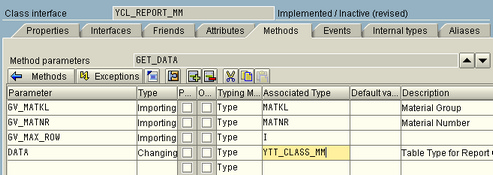
 then double click at 'GET_DATA'
4.Now Create Program "YREPORT_701" by t-code SE38
5.Fill Tittle with "Report Material Master Using Class" save at local object
6.Define Table.
TABLES : mara.
7.Define Variable
DATA : gi_data TYPE YTT_CLASS_MM WITH HEADER LINE.
8.Create input screen
SELECT-OPTIONS so_matkl FOR mara-matkl.
SELECT-OPTIONS so_matnr FOR mara-matnr.
PARAMETERS p_max TYPE i DEFAULT 100.
9.Call method using 'Pattern'
|
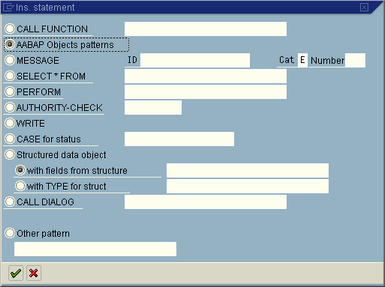 then click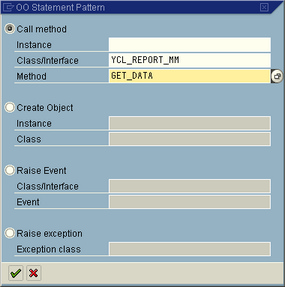
10.Edit 'CALL METHOD' value
Before
CALL METHOD ycl_report_mm=>get_data
EXPORTING
gv_matkl =
gv_matnr =
gv_max_row =
CHANGING
data =
After
CALL METHOD ycl_report_mm=>get_data
EXPORTING
gv_matkl = '001'
gv_matnr = '100-100'
gv_max_row = p_max
CHANGING
data = gi_data[].
11.Save and Activate program
▪Input Selection

▪Output

*&---------------------------------------------------------------------* *& Report YREPORT_701 * *& * *&---------------------------------------------------------------------* *& * *& * *&---------------------------------------------------------------------*
REPORT yreport_701 . TABLES : mara.
DATA : gi_data TYPE YTT_CLASS_MM WITH HEADER LINE.
SELECT-OPTIONS so_matkl FOR mara-matkl. SELECT-OPTIONS so_matnr FOR mara-matnr. PARAMETERS p_max TYPE i DEFAULT 100.
CALL METHOD ycl_report_mm=>get_data EXPORTING gv_matkl = '001' gv_matnr = '100-100' gv_max_row = p_max CHANGING data = gi_data[]. . |
method GET_DATA .
DATA : lw_header TYPE YST_CLASS_MM, lv_counter TYPE i.
*Collect Master Material SELECT matnr matkl bismt meins INTO CORRESPONDING FIELDS OF TABLE DATA FROM mara WHERE matkl = gv_matkl OR matnr = gv_matnr.
*Get Other Requirement Information LOOP AT DATA INTO lw_header. *Max ROW Checking ADD 1 TO lv_counter. IF lv_counter <= gv_max_row OR gv_max_row = 0. WRITE / lw_header-matkl. WRITE lw_header-matnr. WRITE lw_header-maktx. WRITE lw_header-bismt. WRITE lw_header-meins. WRITE lw_header-mseht. ENDIF.
ENDLOOP.
endmethod. |