Objective |
|
SGC Server |
v1.0, v1.1 |
Support |
Source Code is available (Download) |
No |
Description |
|
1 |
Difficulty Level |
Easy |
2 |
Delphi Component |
TButton, TEdit, TCheckBox, TSpinEdit, TGroupBox, TMemo |
3 |
Indy Client Component |
TIdTCPClient, TIdAntiFreeze |
4 |
JVCL Units/Components |
JvExComCtrls, JvComCtrls, JvSimpleXml |
1.Copy Folder \Practice102\ to \Practice103\
2.Run file \Practice103\Practice102.dpr
3.Save as Project of "Practice102.dpr" to "Practice103.dpr"
4.Delete all file with name "Practice102" at folder \Practice103\, and the result like this bellow
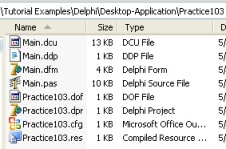
5.Add uses Units of "JvExComCtrls, JvComCtrls and JvSimpleXml"
unit Main;
interface
uses
Windows, Messages, SysUtils, Variants, Classes, Graphics, Controls, Forms,
Dialogs, StdCtrls, Spin, IdAntiFreezeBase, IdAntiFreeze, IdBaseComponent,
//Indy Units/Components
IdComponent, IdTCPConnection, IdTCPClient, ExtCtrls,
//JVCL Units/Components (http://sourceforge.net/projects/jvcl)
JvExComCtrls, JvComCtrls, JvSimpleXml;
...
6.Modified Global Variable, change variable type of "ClientString", "LoginString" into TJvSimpleXml. Also add new variable "XMLReply"
Before
var
Main1: TMain1;
isConnected, isLogin : boolean;
ClientString,LoginString:TStringList;
After
var
Main1: TMain1;
isConnected, isLogin : boolean;
ClientString,LoginString,XMLReply:TJvSimpleXml;
7.Modified Event Create at Main Form and write new code
procedure TMain1.FormCreate(Sender: TObject);
var tmpNodeSGC_CLIENT,tmpNodeCLIENT_STRING:TJvSimpleXMLElem;
begin
XMLReply:=TJvSimpleXml.Create(Application);
//ClientString.Add('<?xml version="1.0" encoding="utf-8"?>');
ClientString:=TJvSimpleXml.Create(Application); //XMl Header created automaticaly
//ClientString.Add('<SGC_CLIENT DATE="' +FloatToStr(Date)+ '" TIME="' +FloatToStr(Time)+ '">');
tmpNodeSGC_CLIENT:=ClientString.Root.Items.Add('SGC_CLIENT');
tmpNodeSGC_CLIENT.Properties.Add('DATE',FloatToStr(Date));
tmpNodeSGC_CLIENT.Properties.Add('TIME',FloatToStr(Time));
//ClientString.Add(' <CLIENT_STRING COMMAND="Get Server String" USERNAME="" PASSWORD="" COMPANY_CODE="" PROGRAM_TYPE="" PROGRAM_CODE="" PARAMETER1="" PARAMETER2="" PARAMETER3=""/>');
tmpNodeCLIENT_STRING:=tmpNodeSGC_CLIENT.Items.Add('CLIENT_STRING');
tmpNodeCLIENT_STRING.Properties.Add('COMMAND' ,'Get Server String');
tmpNodeCLIENT_STRING.Properties.Add('USERNAME' ,'');
tmpNodeCLIENT_STRING.Properties.Add('PASSWORD' ,'');
tmpNodeCLIENT_STRING.Properties.Add('COMPANY_CODE','');
tmpNodeCLIENT_STRING.Properties.Add('PROGRAM_CODE','');
tmpNodeCLIENT_STRING.Properties.Add('PARAMETER1' ,'');
tmpNodeCLIENT_STRING.Properties.Add('PARAMETER2' ,'');
tmpNodeCLIENT_STRING.Properties.Add('PARAMETER3' ,'');
{
SGC Server has an authorization system. The authorization system will be blocked and limited the connection from any SGC Client connection.
There are a several required field to Login and go through the authorization, such as :
=> USERNAME=""
=> PASSWORD=""
=> COMPANY_CODE=""
=> PROGRAM_TYPE=""
=> PROGRAM_CODE=""
If the required fields value doesn't match with authorization configuration at SGC Server then the connection will be refuse (Login Failed).
Assume that you are not login to SGC Server, then Login String always automaticaly filled with this value bellow :
=> USERNAME="DEMO"
=> PASSWORD="123456"
=> COMPANY_CODE="1000"
=> PROGRAM_TYPE="Examples"
=> PROGRAM_CODE="Client_Example_01"
}
//Set Default SGC Client Login for Demo Only
cUserID:= 'DEMO';
cPassword:= '123456';
cCompanyCode:= '1000';
cProgramType:= 'Examples';
cProgramCode:= 'Client_Example_01';
//LoginString.Add('<?xml version="1.0" encoding="utf-8"?>');
LoginString:=TJvSimpleXml.Create(Application); //XMl Header created automaticaly
//LoginString.Add('<SGC_CLIENT DATE="' +FloatToStr(Date)+ '" TIME="' +FloatToStr(Time)+ '">');
tmpNodeSGC_CLIENT:=LoginString.Root.Items.Add('SGC_CLIENT');
tmpNodeSGC_CLIENT.Properties.Add('DATE',FloatToStr(Date));
tmpNodeSGC_CLIENT.Properties.Add('TIME',FloatToStr(Time));
{LoginString.Add(' <CLIENT_STRING COMMAND="Login" '+
'USERNAME="'+cUserID+'" '+
'PASSWORD="'+cPassword+'" '+
'COMPANY_CODE="'+cCompanyCode+'" '+
'PROGRAM_TYPE="'+cProgramType+'" '+
'PROGRAM_CODE="'+cProgramCode+'" '+
'PARAMETER1="" PARAMETER2="" PARAMETER3=""/>'); }
tmpNodeCLIENT_STRING:=tmpNodeSGC_CLIENT.Items.Add('CLIENT_STRING');
tmpNodeCLIENT_STRING.Properties.Add('COMMAND' ,'Login');
tmpNodeCLIENT_STRING.Properties.Add('USERNAME' ,cUserID);
tmpNodeCLIENT_STRING.Properties.Add('PASSWORD' ,cPassword);
tmpNodeCLIENT_STRING.Properties.Add('COMPANY_CODE',cCompanyCode);
tmpNodeCLIENT_STRING.Properties.Add('PROGRAM_CODE',cProgramType);
tmpNodeCLIENT_STRING.Properties.Add('PARAMETER1' ,'');
tmpNodeCLIENT_STRING.Properties.Add('PARAMETER2' ,'');
tmpNodeCLIENT_STRING.Properties.Add('PARAMETER3' ,'');
// ShowMessage(ClientString.XMLData);
// ShowMessage(LoginString.XMLData);
end;
8.Modified Procedure "SendRequest"
...
public
{ Public declarations }
procedure SendRequest(strRequest,strReceive:TJvSimpleXml);
end;
...
procedure TMain1.SendRequest(strRequest,strReceive:TJvSimpleXml);
var strTemp : string;
whileLimit : Extended;
tmpReceive:TStringList;
begin
//Create temporary data
tmpReceive:=TStringList.Create;
strReceive.Root.Clear;
whileLimit:=0;
try
mSLog.Lines.Add('Receiving data form SGC Server');
ShowMessage(strRequest.XMLData);
TCPClient.Write(strRequest.XMLData+Chr(13)+Chr(10));
//Read Connection and ended with '</SGC_SERVER>'
while not TCPClient.ClosedGracefully do
begin
whileLimit:=whileLimit+1;
try
strTemp:=TCPClient.ReadLn;
tmpReceive.Add(strTemp);
if strTemp = '</SGC_SERVER>' then break;
except
break;
end;
if whileLimit > 1000000 then
begin
strTemp:='';
break;
end;
end;
strReceive.LoadFromString(tmpReceive.Text);
mSLog.Lines.Add('Data received');
except
mSLog.Lines.Add('Error While Receiving Data');
end;
//Free temporary data
tmpReceive.Destroy;
end;
9.Modified Event OnClick at bConnect button
procedure TMain1.bConnectClick(Sender: TObject);
begin
if bConnect.Caption = '&Connect' then
begin
mSLog.Lines.Add('Try connect to SGC Server');
try
//Connect to SGC Server
TCPClient.Host := eIPAddress.Text;
TCPClient.Port := sePort1.Value;
TCPClient.Connect;
//Sending command to SGC Server
SendRequest(ClientString,XMLReply);
//Display XML Data
Memo1.Lines.Text:= ClientString.XMLData;
Memo2.Lines.Text:= XMLReply.XMLData;
except
mSLog.Lines.Add('Connection Failed');
end;
end
else
begin
TCPClient.Disconnect;
end;
end;
10.Modified Event OnClick at bLogin button
procedure TMain1.bLoginClick(Sender: TObject);
var tmpReceive:TStringList;
begin
//Sending command to SGC Server
SendRequest(LoginString,XMLReply);
//Display XML Data
Memo1.Lines.Text:= LoginString.XMLData;
Memo2.Lines.Text:= XMLReply.XMLData;
end;
11.Modified Event OnClick at bExecute button
procedure TMain1.bExecuteClick(Sender: TObject);
var tmpRequest:TJvSimpleXml;
tmpNodeSGC_CLIENT,tmpNodeCLIENT_STRING,
tmpNodeFUNCTION, tmpNodeIMPORTS, tmpNodeIMPORT,
tmpNodeTABLES, tmpNodeTABLE, tmpNodeLine :TJvSimpleXMLElem;
Parameter1,Parameter2,Parameter3:string;
begin
{
In SGC Server version 1.0, Parameters is used for "Get Function Info" and "Run Function" command.
Parameter 1 = Menu Function
Parameter 2 = Function Name
Note: First, you must register the SAP Function Module (RFC/BAPI) in SGC Server.
Open Client_Example_02 to show an advanced demo about "Run Function" command.
}
//Set Parameters
if (cbCommand.Text='Get Function Info') or (cbCommand.Text='Run Function') then
begin
Parameter1:='SAP Tools'; //Menu Function
Parameter2:='RFC_READ_TABLE'; //Function Name
end;
//Write the Top of SGC Command
//Create XML Header
tmpRequest:=TJvSimpleXml.Create(Application);
//Create Node "SGC_CLIENT"
tmpNodeSGC_CLIENT:=tmpRequest.Root.Items.Add('SGC_CLIENT');
tmpNodeSGC_CLIENT.Properties.Add('DATE',FloatToStr(Date));
tmpNodeSGC_CLIENT.Properties.Add('TIME',FloatToStr(Time));
//Create Node "CLIENT_STRING"
tmpNodeCLIENT_STRING:=tmpNodeSGC_CLIENT.Items.Add('CLIENT_STRING');
tmpNodeCLIENT_STRING.Properties.Add('COMMAND' ,cbCommand.Text);
tmpNodeCLIENT_STRING.Properties.Add('USERNAME' ,cUserID);
tmpNodeCLIENT_STRING.Properties.Add('PASSWORD' ,cPassword);
tmpNodeCLIENT_STRING.Properties.Add('COMPANY_CODE',cCompanyCode);
tmpNodeCLIENT_STRING.Properties.Add('PROGRAM_TYPE',cProgramType);
tmpNodeCLIENT_STRING.Properties.Add('PROGRAM_CODE',cProgramCode);
tmpNodeCLIENT_STRING.Properties.Add('PARAMETER1' ,Parameter1);
tmpNodeCLIENT_STRING.Properties.Add('PARAMETER2' ,Parameter2);
tmpNodeCLIENT_STRING.Properties.Add('PARAMETER3' ,Parameter3);
//Addtional String for Command of 'Run Function'
if cbCommand.Text='Run Function' then
begin
{
This's example of XML code for executing 'RFC_READ_TABLE' function.
}
//Create Node "Function"
tmpNodeFUNCTION:=tmpNodeSGC_CLIENT.Items.Add('FUNCTION');
//Create Node "IMPORTS"
tmpNodeIMPORTS:=tmpNodeFUNCTION.Items.Add('IMPORTS');
//Varible import 1 - Create Node "IMPORT"
tmpNodeIMPORT:=tmpNodeIMPORTS.Items.Add('IMPORT');
tmpNodeIMPORT.Properties.Add('NAME', 'QUERY_TABLE');
tmpNodeIMPORT.Properties.Add('DEFAULT_VALUE', 'T001');
tmpNodeIMPORT.Properties.Add('STRUCTURE', 'False');
//Varible import 2 - Create Node "IMPORT"
tmpNodeIMPORT:=tmpNodeIMPORTS.Items.Add('IMPORT');
tmpNodeIMPORT.Properties.Add('NAME', 'DELIMITER');
tmpNodeIMPORT.Properties.Add('DEFAULT_VALUE', ';');
tmpNodeIMPORT.Properties.Add('STRUCTURE', 'False');
//Varible import 3 - Create Node "IMPORT"
tmpNodeIMPORT:=tmpNodeIMPORTS.Items.Add('IMPORT');
tmpNodeIMPORT.Properties.Add('NAME', 'ROWSKIPS');
tmpNodeIMPORT.Properties.Add('DEFAULT_VALUE', '0');
tmpNodeIMPORT.Properties.Add('STRUCTURE', 'False');
//Varible import 4 - Create Node "IMPORT"
tmpNodeIMPORT:=tmpNodeIMPORTS.Items.Add('IMPORT');
tmpNodeIMPORT.Properties.Add('NAME', 'ROWCOUNT');
tmpNodeIMPORT.Properties.Add('DEFAULT_VALUE', '1000');
tmpNodeIMPORT.Properties.Add('STRUCTURE', 'False');
//Create Node "TABLES"
tmpNodeTABLES:=tmpNodeFUNCTION.Items.Add('TABLES');
//Varible table 1 - Create Node "TABLE"
tmpNodeTABLE:=tmpNodeTABLES.Items.Add('TABLE');
tmpNodeTABLE.Properties.Add('NAME','OPTIONS');
//Inser Line 1 - Create Node "LINE"
tmpNodeLine:=tmpNodeTABLE.Items.Add('LINE');
tmpNodeLine.Properties.Add('TEXT','SPRAS = ''EN''');
{ tmpRequest.Add('<FUNCTION>');
tmpRequest.Add(' <IMPORTS>');
tmpRequest.Add(' <IMPORT NAME="QUERY_TABLE" DEFAULT_VALUE="T001" STRUCTURE="False"/>');
tmpRequest.Add(' <IMPORT NAME="DELIMITER" DEFAULT_VALUE=";" STRUCTURE="False"/>');
tmpRequest.Add(' <IMPORT NAME="ROWSKIPS" DEFAULT_VALUE="0" STRUCTURE="False"/>');
tmpRequest.Add(' <IMPORT NAME="ROWCOUNT" DEFAULT_VALUE="1000" STRUCTURE="False"/>');
tmpRequest.Add(' </IMPORTS>');
tmpRequest.Add(' <TABLES>');
tmpRequest.Add(' <TABLE NAME="OPTIONS">');
tmpRequest.Add(' <LINE TEXT="SPRAS = 'EN'"/>');
tmpRequest.Add(' </TABLE>');
tmpRequest.Add(' </TABLES>');
tmpRequest.Add(' </FUNCTION>'); }
end;
//Sending command to SGC Server
SendRequest(tmpRequest,XMLReply);
//Display XML Data
Memo1.Lines.Text:= tmpRequest.XMLData;
Memo2.Lines.Text:= XMLReply.XMLData;
//Free temporary data
tmpRequest.Destroy;
end;
12.Save and Run the application
Same as with Practice (102)