Objective |
|
SGC Server |
v1.0, v1.1 |
Support |
Source Code is available (Download) |
No |
Description |
|
1 |
Difficulty Level |
Easy |
2 |
Delphi Component |
TButton, TEdit, TCheckBox, TSpinEdit, TGroupBox, TMemo |
3 |
Indy Client Component |
TIdTCPClient, TIdAntiFreeze |
1.Copy Folder \Practice101\ to \Practice102\
2.Run file \Practice102\Practice101.dpr
3.Save as Project of "Practice101.dpr" to "Practice102.dpr"
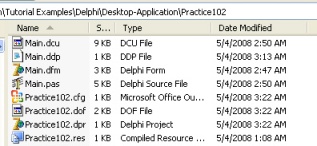
4.Delete all file with name "Practice101" at folder \Practice102\, and the result like this bellow
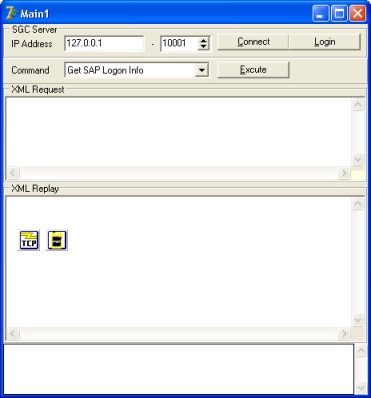
5.Add and design a components to component list bellow
No |
Component |
Properties |
Value |
Design |
1 |
TButton |
Name |
bConnect |
|
|
|
Caption |
&Connect |
|
2 |
TEdit |
Name |
eIPAddress |
|
|
|
Text |
127.0.0.1 |
|
3 |
TSpinEdit |
Name |
sePort1 |
|
|
|
Value |
10001 |
|
5 |
TButton |
Name |
bLogin |
|
|
|
Caption |
&Login |
|
|
|
Enabled |
False |
|
5 |
TMemo |
Name |
Memo1 |
|
6 |
TMemo |
Name |
Memo2 |
|
7 |
TMemo |
Name |
mSLog |
|
8 |
TidTCpClient |
Name |
TCPClient |
|
|
|
Host |
127.0.0.1 |
|
9 |
TIdAntiFreeze |
Name |
IdAntiFreeze |
|
10 |
TComboBox |
Name |
cbCommand |
|
|
|
Items |
Get Server String Get SAP Logon Info Get User Menu List Get Function Info Run Function Login Logout |
|
|
|
Style |
csDropDownList |
|
11 |
TButton |
Name |
bExecute |
|
|
|
Caption |
&Execute |
|
|
|
Enabled |
False |
6.Modified Event OnConnected at TCPClient and add code of " bExecute.Enabled:=true;"
Before
bConnect.Caption := '&Disconnect';
eIPAddress.Enabled:=false;
sePort1.Enabled:=false;
bLogin.Enabled:=true;
isConnected:=true;
mSLog.Lines.Add('Connections is succeed');
After
bConnect.Caption := '&Disconnect';
eIPAddress.Enabled:=false;
sePort1.Enabled:=false;
bLogin.Enabled:=true;
bExecute.Enabled:=true;
isConnected:=true;
mSLog.Lines.Add('Connections is succeed');
7.Modified Event OnDiconnected at TCPClient and add code of " bExecute.Enabled:=false;"
Before
bConnect.Caption := '&Connect';
eIPAddress.Enabled:=true;
sePort1.Enabled:=true;
bLogin.Enabled:=false;
isLogin:=false;
isConnected:=false;
Memo1.Lines.Clear;
Memo2.Lines.Clear;
mSLog.Lines.Add('Disconnected form server');
After
bConnect.Caption := '&Connect';
eIPAddress.Enabled:=true;
sePort1.Enabled:=true;
bLogin.Enabled:=false;
bExecute.Enabled:=false;
isLogin:=false;
isConnected:=false;
Memo1.Lines.Clear;
Memo2.Lines.Clear;
mSLog.Lines.Add('Disconnected form server');
8.Add Event OnClick at bExecute button and then write code to executing a selected Command at cbCommand
procedure TMain1.bExecuteClick(Sender: TObject);
var tmpRequest,tmpReceive:TStringList;
Parameter1,Parameter2,Parameter3:string;
begin
{
In SGC Server version 1.0, Parameters is used for "Get Function Info" and "Run Function" command.
Parameter 1 = Menu Function
Parameter 2 = Function Name
Note: First, you must register the SAP Function Module (RFC/BAPI) in SGC Server.
Open Client_Example_02 to show an advanced demo about "Run Function" command.
}
//Set Parameters
if (cbCommand.Text='Get Function Info') or (cbCommand.Text='Run Function') then
begin
Parameter1:='SAP Tools'; //Menu Function
Parameter2:='RFC_READ_TABLE';//Function Name
end;
//Create temporary data
tmpRequest:=TStringList.Create;
tmpReceive:=TStringList.Create;
//Write the Top of SGC Command
tmpRequest.Add('<?xml version="1.0" encoding="utf-8"?>');
tmpRequest.Add('<SGC_CLIENT DATE="' +FloatToStr(Date)+ '" TIME="' +FloatToStr(Time)+ '">');
tmpRequest.Add(' <CLIENT_STRING COMMAND="'+cbCommand.Text+'" '+
'USERNAME="'+cUserID+'" '+
'PASSWORD="'+cPassword+'" '+
'COMPANY_CODE="'+cCompanyCode+'" '+
'PROGRAM_TYPE="'+cProgramType+'" '+
'PROGRAM_CODE="'+cProgramCode+'" '+
'PARAMETER1="'+Parameter1+'" '+
'PARAMETER2="'+Parameter2+'" '+
'PARAMETER3="'+Parameter3+'"/>');
//Addtional String for Command of 'Run Function'
if cbCommand.Text='Run Function' then
begin
{
This's example of XML code for executing 'RFC_READ_TABLE' function.
}
tmpRequest.Add('<FUNCTION>');
tmpRequest.Add(' <IMPORTS>');
tmpRequest.Add(' <IMPORT NAME="QUERY_TABLE" DEFAULT_VALUE="T001" STRUCTURE="False"/>');
tmpRequest.Add(' <IMPORT NAME="DELIMITER" DEFAULT_VALUE=";" STRUCTURE="False"/>');
tmpRequest.Add(' <IMPORT NAME="ROWSKIPS" DEFAULT_VALUE="0" STRUCTURE="False"/>');
tmpRequest.Add(' <IMPORT NAME="ROWCOUNT" DEFAULT_VALUE="1000" STRUCTURE="False"/>');
tmpRequest.Add(' </IMPORTS>');
tmpRequest.Add(' <TABLES>');
tmpRequest.Add(' <TABLE NAME="OPTIONS">');
tmpRequest.Add(' <LINE TEXT="SPRAS = 'EN'"/>');
tmpRequest.Add(' </TABLE>');
tmpRequest.Add(' </TABLES>');
tmpRequest.Add(' </FUNCTION>');
end;
tmpRequest.Add('</SGC_CLIENT>');
//Don't forget to adding an empty line after '</SGC_CLIENT>'
tmpRequest.Add(' ');
//Sending command to SGC Server
SendRequest(tmpRequest,tmpReceive);
//Display XML Data
Memo1.Lines.Text:= tmpRequest.Text;
Memo2.Lines.Text:= tmpReceive.Text;
//Free temporary data
tmpRequest.Destroy;
tmpReceive.Destroy;
end;
9.Save and Run the application
▪Screen 1. Connected to SGC Server
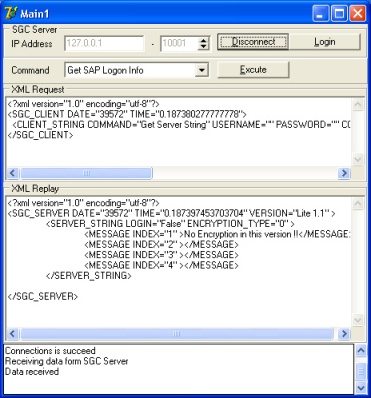
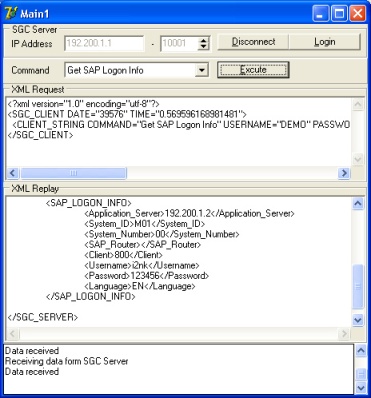
▪Screen 2. Execute Command of "Get Sap Logon Info"
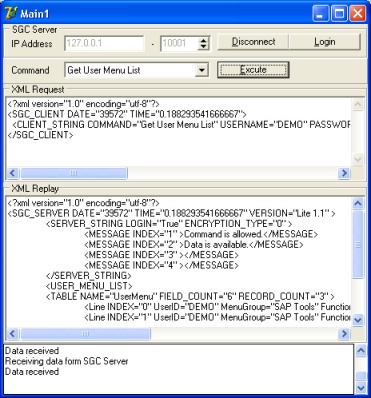
▪Screen 3. Execute Command of "Get User Menu List"
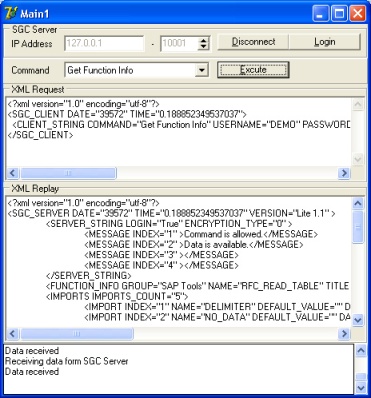
▪Screen 4. Execute Command of "Get Function Info"
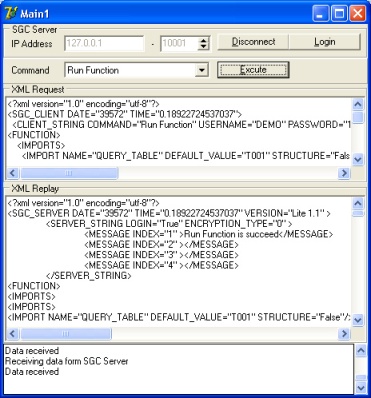
▪Screen 5. Execute Command of "Run Function"