Objective |
|
Transaction Code |
MM03 - Display Material |
Tables |
MARA - General Material Data MAKT - Material Descriptions T006A - Assign Internal to Language-Dependent Unit |
External Application |
|
Support |
|
1.Create Function Module "YFM_RFC_PRACTICE_101"
2.Register Function Module "YFM_RFC_PRACTICE_101" to SGC Server
Read : How to Register Function Module at SGC Server manual
3.Set Authorization to SGC user
Read : How to Set Function Authorization at SGC Server manual
4.Add "YFM_RFC_PRACTICE_101" to SAP RFC Pro 2.x.
Read : How to Add Function Name at SAP RFC Pro 2.x manual
Configure the the Function according parameter bellow :
Function

Title = "PRACTICE 101"
Imports Variable

▪GV_MATKL
Title = "Material Group"
DEFAULT_VALUE = "001"
▪GV_MATNR
Title = "Material Number"
▪GV_MAX_ROW
Title = "Max. Row"
DEFAULT_VALUE = "100"
DATA_TYPE = "INTEGER"
Table"GI_HEADER"
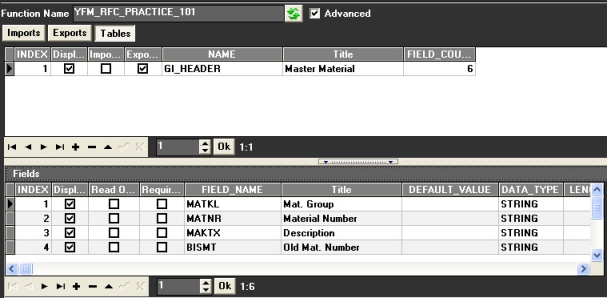
Title = "Master Material"
▪MATKL
Title = "Mat. Group"
▪MATNR
Title = "Material Number"
▪MAKTX
Title = "Description"
▪BISMT
Title = "Old Mat. Number"
▪MEINS
Title = "Base Unit"
▪MSEHT
Title = "Measurement"
5.Customize the Form like this bellow
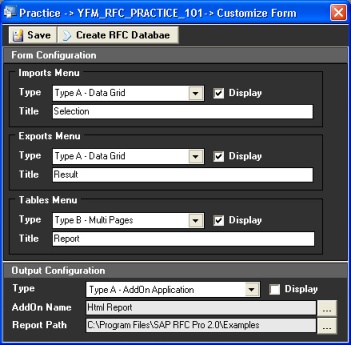
6.Click " " and close then Customize Form
7.Double click " " node to Open the Form
8.Click " " to get data from SAP
9.Finished
▪Input Selection
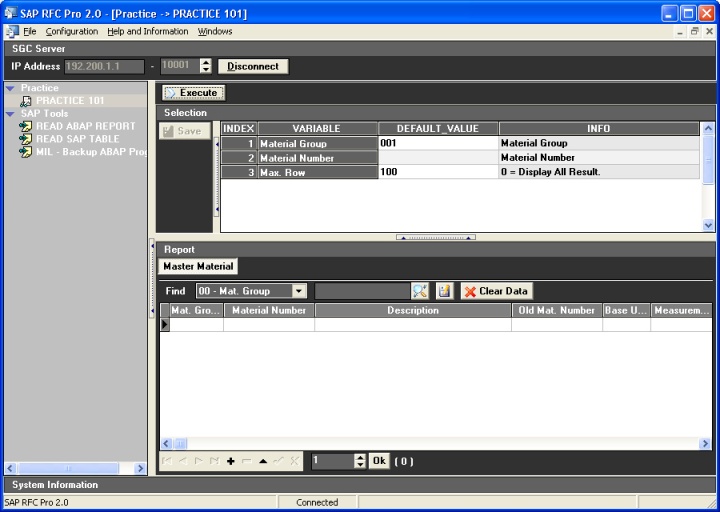
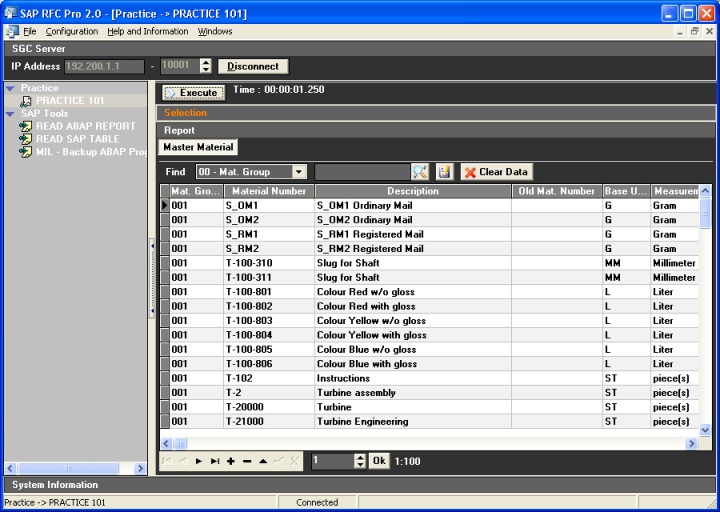
▪Output