Objective |
|
Transaction Code |
|
Support |
|
1.Open t-Code "SE37"
2.Enter new Function "YFM_DATE_TO_STRING"
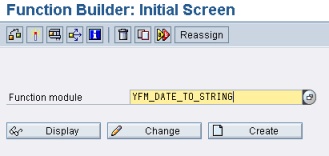
3.Click " "
"
4.Fill Function group with "YFG_UTILITIES" and Short text with "Convert Date to String"
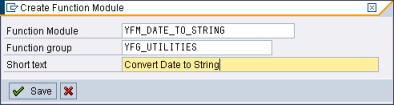
5.Click " " to save function
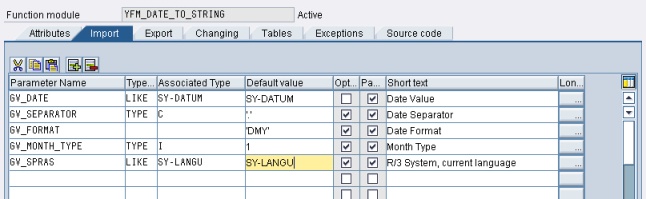
6.Add import variable like this screen capture bellow
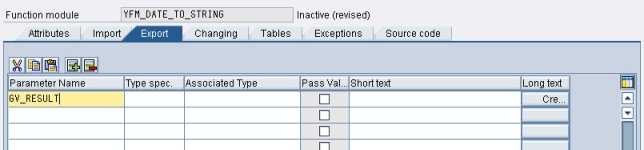
7.Add export variable like this screen capture bellow
8.Add new Source Code, Copy and paste this source code bellow to "Source Code" tab
FUNCTION yfm_date_to_string. *"---------------------------------------------------------------------- *"*"Local interface: *" IMPORTING *" VALUE(GV_DATE) LIKE SY-DATUM DEFAULT SY-DATUM *" VALUE(GV_SEPARATOR) TYPE C DEFAULT '.' *" VALUE(GV_FORMAT) DEFAULT 'DMY' *" VALUE(GV_MONTH_TYPE) TYPE I DEFAULT 1 *" VALUE(GV_SPRAS) LIKE SY-LANGU DEFAULT SY-LANGU *" EXPORTING *" REFERENCE(GV_RESULT) *"----------------------------------------------------------------------
TABLES : t247.
DATA : gv_day(2) TYPE c, gv_month(2) TYPE c, gv_year(4) TYPE c, gv_str(3) TYPE c.
* Split date into its parts gv_year = gv_date(4). gv_month = gv_date+4(2). gv_day = gv_date+6(2).
* Get Month IF gv_month_type <> 0. SELECT SINGLE * FROM t247 WHERE spras = gv_spras AND mnr = gv_month. ENDIF.
* Proses gv_result = ''. CASE gv_format. WHEN 'DMY'. IF gv_separator IS INITIAL. CASE gv_month_type. WHEN 0. CONCATENATE gv_day gv_month gv_year INTO gv_result SEPARATED BY space. WHEN 1. CONCATENATE gv_day t247-ktx gv_year INTO gv_result SEPARATED BY space. WHEN 2. CONCATENATE gv_day t247-ltx gv_year INTO gv_result SEPARATED BY space. ENDCASE. ELSE. CASE gv_month_type. WHEN 0. CONCATENATE gv_day gv_separator gv_month gv_separator gv_year INTO gv_result. WHEN 1. CONCATENATE gv_day gv_separator t247-ktx gv_separator gv_year INTO gv_result. WHEN 2. CONCATENATE gv_day gv_separator t247-ltx gv_separator gv_year INTO gv_result. ENDCASE. ENDIF. WHEN 'MDY'. IF gv_separator IS INITIAL. CASE gv_month_type. WHEN 0. CONCATENATE gv_month gv_day gv_year INTO gv_result SEPARATED BY space. WHEN 1. CONCATENATE t247-ktx gv_day gv_year INTO gv_result SEPARATED BY space. WHEN 2. CONCATENATE gv_day ',' INTO gv_str.
CONCATENATE t247-ltx gv_str gv_year INTO gv_result SEPARATED BY space. ENDCASE. ELSE. CASE gv_month_type. WHEN 0. CONCATENATE gv_month gv_separator gv_day gv_separator gv_year INTO gv_result. WHEN 1. CONCATENATE t247-ktx gv_separator gv_day gv_separator gv_year INTO gv_result. WHEN 2. CONCATENATE gv_day ',' INTO gv_str.
CONCATENATE t247-ltx gv_str gv_year INTO gv_result SEPARATED BY space. ENDCASE. ENDIF. WHEN 'YMD'. IF gv_separator IS INITIAL. CASE gv_month_type. WHEN 0. CONCATENATE gv_year gv_month gv_day INTO gv_result SEPARATED BY space. WHEN 1. CONCATENATE gv_year t247-ktx gv_day INTO gv_result SEPARATED BY space. WHEN 2. CONCATENATE gv_year t247-ltx gv_day INTO gv_result SEPARATED BY space. ENDCASE. ELSE. CASE gv_month_type. WHEN 0. CONCATENATE gv_year gv_separator gv_month gv_separator gv_day INTO gv_result. WHEN 1. CONCATENATE gv_year gv_separator t247-ktx gv_separator gv_day INTO gv_result. WHEN 2. CONCATENATE gv_year gv_separator t247-ltx gv_separator gv_day INTO gv_result. ENDCASE. ENDIF. ENDCASE.
ENDFUNCTION. |
9.Save and activate the function
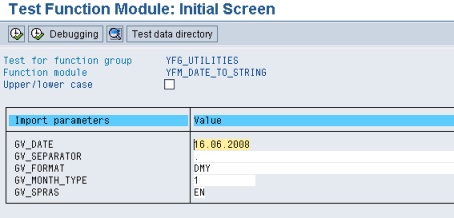
▪Input
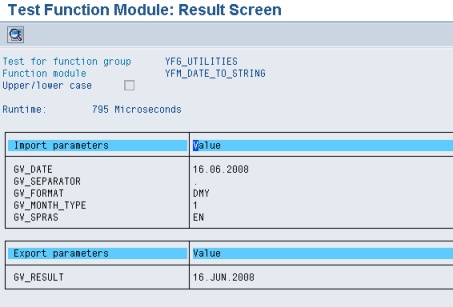
▪Output
Original Created By : Endro Koesno/EDP/WINGS
Modified By : Albertus Reinandang