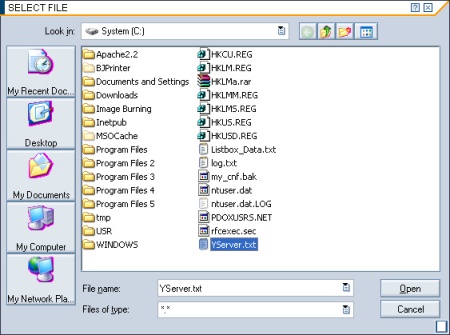
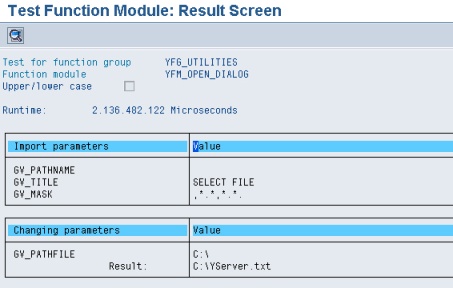
Objective |
|
Transaction Code |
|
Support |
|
1.Open t-Code "SE37"
2.Enter new Function "YFM_OPEN_DIALOG"
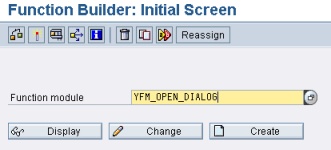
3.Click " "
"
4.Fill Function groupwith "YFG_UTILITIES" and Short text with "Run Open Dialog"
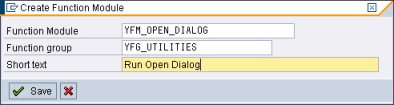
5.Click " " to save function
6.Add import variable like this screen capture bellow
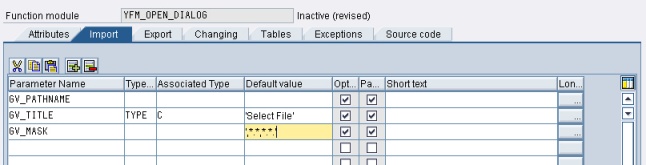
7.Add changing variable like this screen capture bellow

8.Add exceptions variable like this screen capture bellow
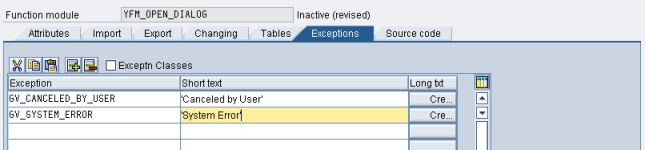
9.Add new Source Code, Copy and paste this source code bellow to "Source Code" tab
FUNCTION yfm_open_dialog. *"---------------------------------------------------------------------- *"*"Local interface: *" IMPORTING *" VALUE(GV_PATHNAME) OPTIONAL *" VALUE(GV_TITLE) TYPE C DEFAULT 'Select File' *" VALUE(GV_MASK) DEFAULT ',*.*,*.*.' *" CHANGING *" VALUE(GV_PATHFILE) *" EXCEPTIONS *" GV_CANCELED_BY_USER *" GV_SYSTEM_ERROR *"----------------------------------------------------------------------
DATA: lv_pathfile LIKE /sapdmc/lsscreen-pathfile, lv_pathname LIKE /sapdmc/lsscreen-pathname.
lv_pathfile = gv_pathfile. lv_pathname = gv_pathname.
IF lv_pathname IS INITIAL. CALL FUNCTION '/SAPDMC/LSM_PATH_FILE_SPLIT' EXPORTING pathfile = lv_pathfile IMPORTING pathname = lv_pathname EXCEPTIONS OTHERS = 1. ENDIF.
CALL FUNCTION 'WS_FILENAME_GET' EXPORTING def_filename = ' ' def_path = lv_pathname mask = gv_mask " unbedingt erforderlich! mode = 'O' title = gv_title IMPORTING filename = lv_pathfile EXCEPTIONS inv_winsys = 1 no_batch = 2 selection_cancel = 3 selection_error = 4 OTHERS = 5.
CASE sy-subrc. WHEN 0. gv_pathfile = lv_pathfile. WHEN 3. RAISE gv_canceled_by_user. WHEN OTHERS. RAISE gv_system_error. ENDCASE.
ENDFUNCTION. |
10.Save and activate the function
▪Input
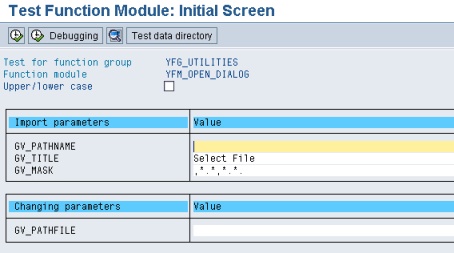
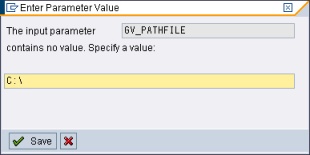
▪Output