Objective |
|
Transaction Code |
|
Tables |
MARA - General Material Data (Data Material Umum) |
Support |
|
Contributors |
Name of the form : YFO_PRACTICE_101
Meaning : Form List of Master Material
2. Double-click on the menu "Form Interface"
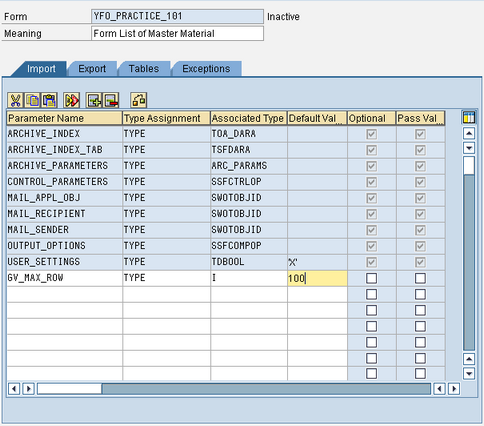
3. Open the tab "Import" and add the import parameters, like the image below
4. Open the tab "Tables" and add the parameter tables, like the image below
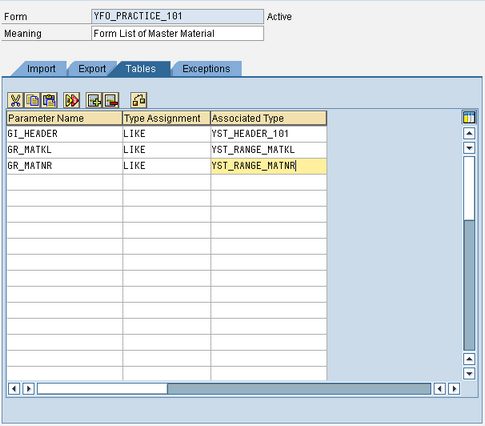
How to make: YST_HEADER_101, YST_RANGE_MATKL, YST_RANGE_MATNR
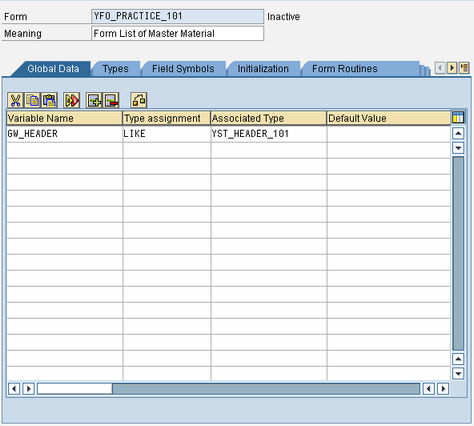
5. Double-click on the menu "Global Definition"
6. Open the tab "Global Data" and add the parameters like the image below
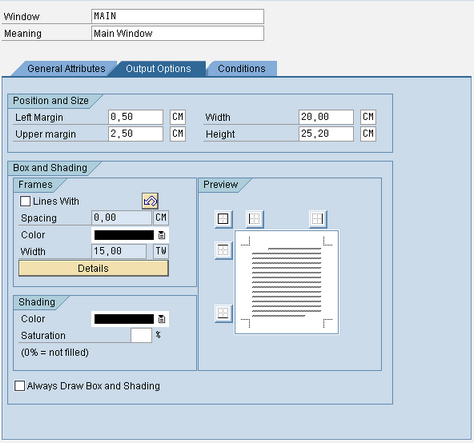
7. Double-click on the menu "Main"
8. Open the tab "Output Options" and set the value "Possition and Size" as shown below
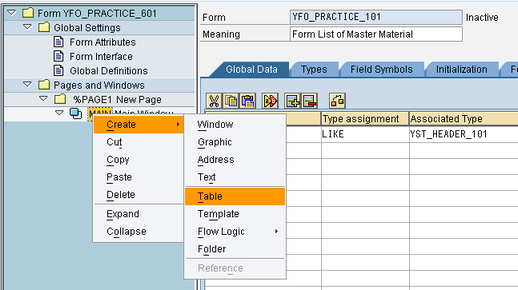
9. Right-click on the menu "Main" and click on "Create> Table" to create a Table (List data)
10. Click " " on the Tab "Table" to define the columns to be displayed
11. Fill in value as the image below
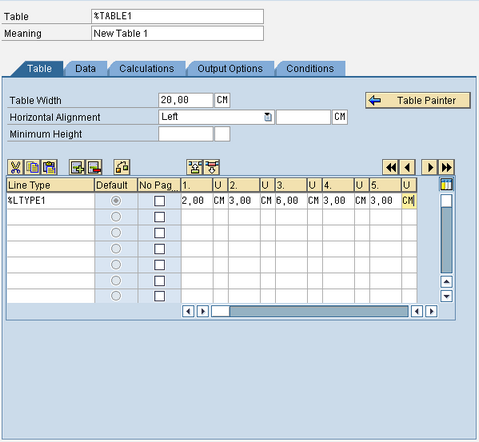
Note: The total value of all columns must be no more than"Table Width"
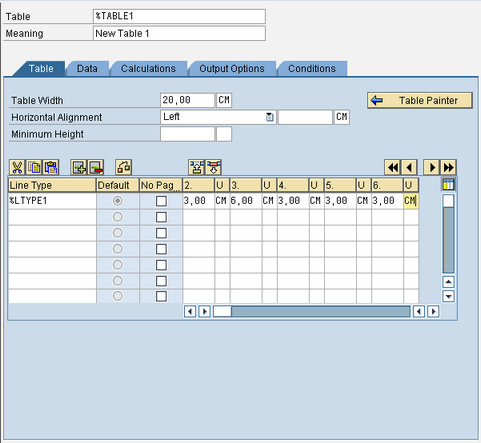
12. Press " " to add a column
13. Add the value in column number 6 with values like image below
14. Press " " to return to the initial menu
15. Press " " to set the pattern of lines on the List Data
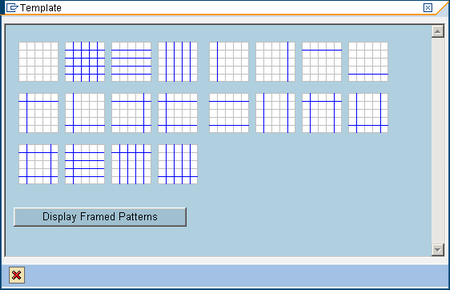
16. Press " "
"
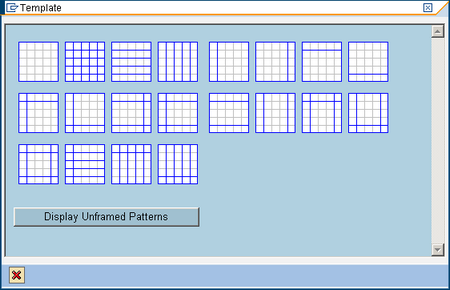
17. Select a pattern to the second from the top left, so that all boxes are filled in each row

18. Click Tab "Data" and enter the values as shown below
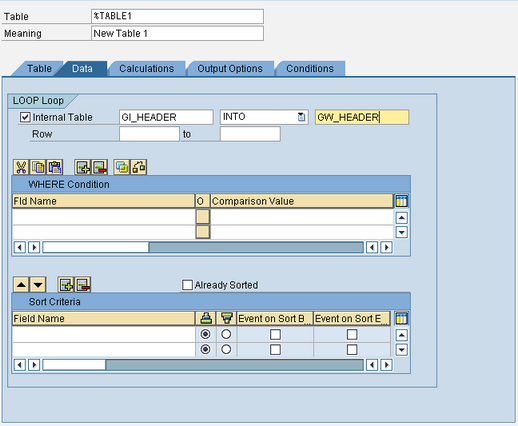
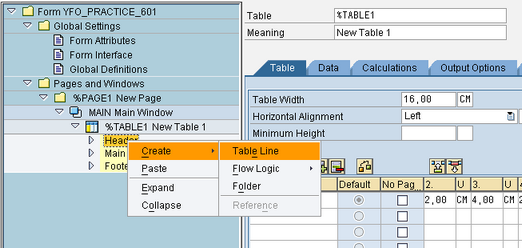
19. Right-click on the menu "Header" and click on "Create> Table Line" to make a header on the List Data
20. Select Line Type "%LTYPE1" and automatically column (Cell) will be formed
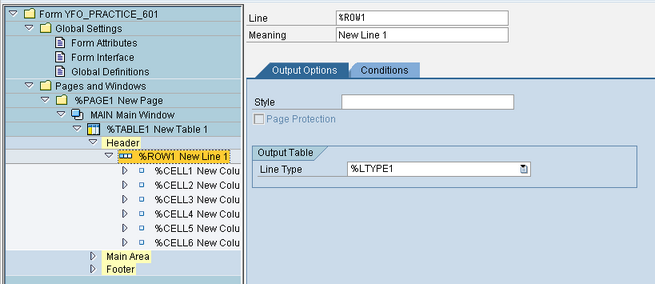
Note : 1 CELL represents a 1 column.
21. Right-click on the menu "%CELL1" and Click "Create > Text" to create the column header title
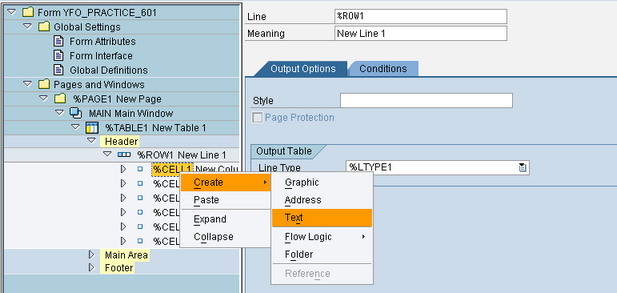
22. Open Tab "General Attribute" and content of text "Mat. Group" like the picture below.
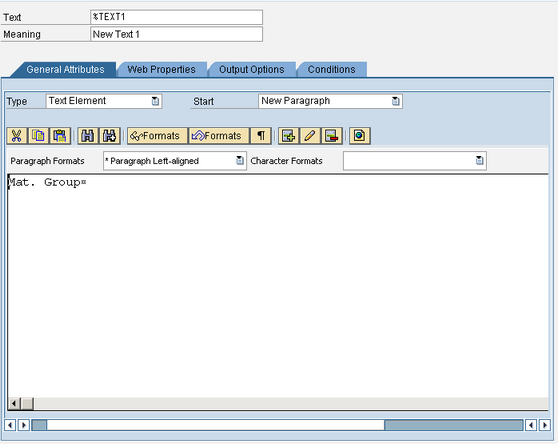
23. Re doing steps 15 and 16 for "%CELL2" until "%CELL6" with the following text
"%CELL2" = Mat. No.
"%CELL3" = Description
"%CELL4" = Old Mat. No.
"%CELL5" = Base Unit of Measure
"%CELL6" = Measure
Note : Do not forget to press the button " " every single long process
24. Right-click on the menu "Main Area" and click "Create > Table Line" to make Line Data
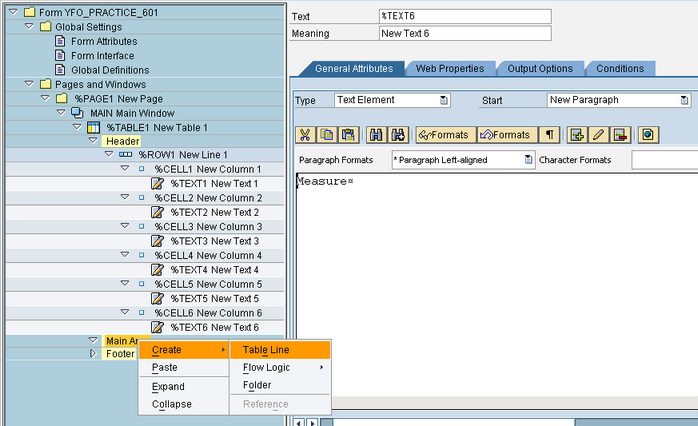
25. Select line type "%LTYPE1" and automatically column (Cell) will be formed
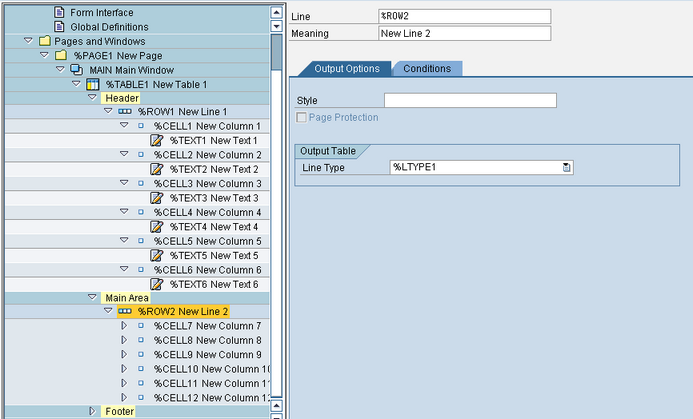
26. Right-click on the menu "%CELL7" and click "Create > Text" to create a row of data in column
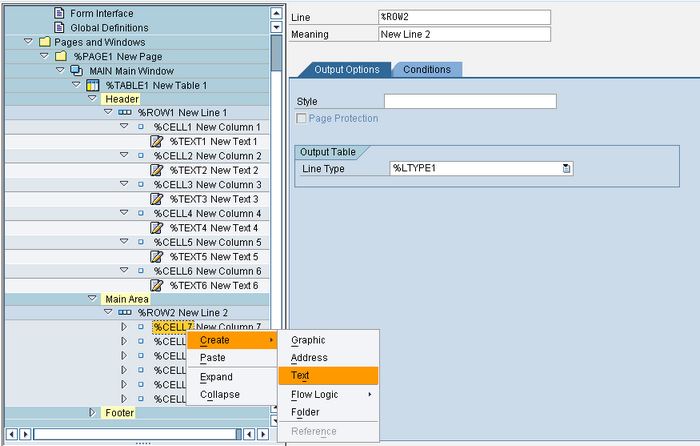
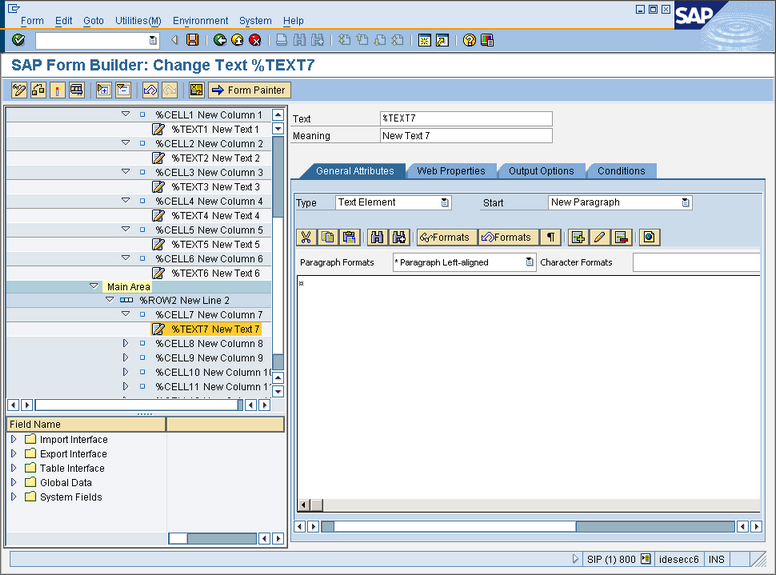
27. Open Tab "General Attribute"
28. Click " Utilities > Field List on/off" or press "Ctrl + Shift + F4" to open the List of parameters in the declaration on steps 3-7
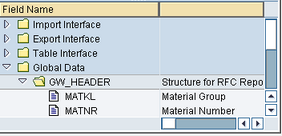
29. Open Field "Global Data > GW_HEADER"
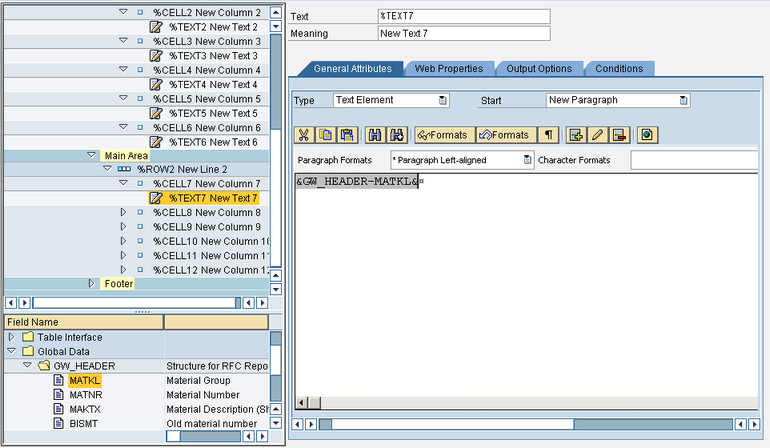
30. Drag and Drop "MATKL" into Tab "General Attributes"
31. Do it again, step 21 dan 25 for "%CELL8" until "%CELL12" with the following text
"%CELL8" = MATNR
"%CELL9" = MAKTX
"%CELL10" = BISMT
"%CELL11" = MEINS
"%CELL12" = MSEHT
Note : don not forget to press the button "" every single long process
32. Press " " for activation and check form
33. Press " " to test running Form
34. Finished
1.Open SE38
2.Copy Program "YPRACTICE_101" become "YPRACTICE_601"
3.Change Programs "YPRACTICE_601"
4.Open Goto > Attributes, and change "Title" with "601 - Display List of Master Material"
5.Modification Declaration Report
Before
REPORT ypractice_101.
After
REPORT ypractice_601.
6.Modified "GLOBAL VARIABLE DECRALATION"
Before
*----------------------------------------------------------------------*
*GLOBAL VARIABLE DECRALATION
*----------------------------------------------------------------------*
DEFINE macro_data_possition.
if &1 = 'HEADER'.
write : /'|' no-gap,(9) &2 centered,
'|' no-gap,(18) &3 centered,
'|' no-gap,(40) &4 centered,
'|' no-gap,(18) &5 centered,
'|' no-gap,(5) &6 centered,
'|' no-gap,(10) &7 centered,
'|' no-gap.
else.
write : /'|' no-gap,(9) &2 centered,
'|' no-gap,(18) &3 ,
'|' no-gap,(40) &4 ,
'|' no-gap,(18) &5 ,
'|' no-gap,(5) &6 ,
'|' no-gap,(10) &7 ,
'|' no-gap.
endif.
END-OF-DEFINITION.
TYPES: BEGIN OF ty_header,
matkl LIKE mara-matkl, " Material Group
matnr LIKE mara-matnr, " Material Number
maktx LIKE makt-maktx, " Material Description
bismt LIKE mara-bismt, " Old material number
meins LIKE mara-meins, " Base Unit of Measure
mseht LIKE t006a-mseht, " Unit of Measurement Text
END OF ty_header.
DATA: gi_header TYPE STANDARD TABLE OF ty_header WITH HEADER LINE,
gi_makt LIKE STANDARD TABLE OF makt WITH HEADER LINE,
gi_t006a LIKE STANDARD TABLE OF t006a WITH HEADER LINE.
DATA: gv_width TYPE i. " Width of list
After
*----------------------------------------------------------------------*
*GLOBAL VARIABLE DECRALATION
*----------------------------------------------------------------------*
DATA: gi_header LIKE STANDARD TABLE OF yst_header_101 WITH HEADER LINE,
gi_makt LIKE STANDARD TABLE OF makt WITH HEADER LINE,
gi_t006a LIKE STANDARD TABLE OF t006a WITH HEADER LINE.
7.Modified "Input Screen/Selection"
Before
*----------------------------------------------------------------------*
*Input Screen/Selection
*----------------------------------------------------------------------*
SELECT-OPTIONS so_matkl FOR mara-matkl.
SELECT-OPTIONS so_matnr FOR mara-matnr.
After
*----------------------------------------------------------------------*
*Input Screen/Selection
*----------------------------------------------------------------------*
SELECTION-SCREEN BEGIN OF BLOCK groupbox1 WITH FRAME TITLE text_101. "Declare Group Box 1
SELECTION-SCREEN BEGIN OF LINE.
SELECTION-SCREEN COMMENT 1(18) text_102 FOR FIELD so_matkl.
SELECT-OPTIONS so_matkl FOR mara-matkl.
SELECTION-SCREEN END OF LINE.
SELECTION-SCREEN BEGIN OF LINE.
SELECTION-SCREEN COMMENT 1(18) text_103 FOR FIELD so_matnr.
SELECT-OPTIONS so_matnr FOR mara-matnr.
SELECTION-SCREEN END OF LINE.
SELECTION-SCREEN END OF BLOCK groupbox1. "End Group Box 1
SELECTION-SCREEN BEGIN OF BLOCK groupbox2 WITH FRAME TITLE text_201. "Declare Group Box 2
SELECTION-SCREEN BEGIN OF LINE.
SELECTION-SCREEN COMMENT 1(18) text_202 FOR FIELD p_mrow.
PARAMETERS p_mrow TYPE i DEFAULT 1000 LENGTH 5.
SELECTION-SCREEN END OF LINE.
SELECTION-SCREEN END OF BLOCK groupbox2. "End Group Box 2
8.Create Event and Initialization code, write down the Input Screen Block
*----------------------------------------------------------------------*
*EVENT
*----------------------------------------------------------------------*
AT SELECTION-SCREEN OUTPUT.
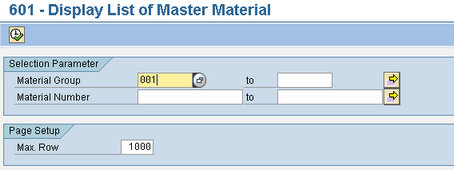
text_101 = 'Selection Parameter'.
text_102 = 'Material Group'.
text_103 = 'Material Number'.
text_201 = 'Page Setup'.
text_202 = 'Max. Row'.
*----------------------------------------------------------------------*
*INITIALIZATION
*----------------------------------------------------------------------*
INITIALIZATION.
9.Modified "MAIN PROGRAM"
Before
*======================================================================*
*MAIN PROGRAM
*Execute after Input Screen
*======================================================================*
START-OF-SELECTION.
gv_width = 113.
PERFORM fm_collect_data.
PERFORM fm_process_data.
PERFORM fm_display_data.
END-OF-SELECTION.
After
*======================================================================*
*MAIN PROGRAM
*Execute after Input Screen
*======================================================================*
START-OF-SELECTION.
PERFORM fm_collect_data.
PERFORM fm_process_data.
PERFORM fm_display_data.
END-OF-SELECTION.
10.Modifications sub routine"fm_display_data"
Before
*&--------------------------------------------------------------------*
*& Form fm_display_data
*&--------------------------------------------------------------------*
* text
*---------------------------------------------------------------------*
FORM fm_display_data.
* Membuat Teks header
ULINE AT (gv_width). " Upper frame border
FORMAT COLOR COL_HEADING INTENSIFIED. " Title color
macro_data_possition : 'HEADER' 'Mat. Group' 'Mat. No.' 'Description' 'Old Mat. No.' 'Base Unit' 'Measure'.
WRITE: AT gv_width sy-vline. " Right border
ULINE AT (gv_width). " Line below titles
FORMAT COLOR OFF.
* Menampilkan Data ke Screen
LOOP AT gi_header.
macro_data_possition : 'CONTENT'
gi_header-matkl
gi_header-matnr
gi_header-maktx
gi_header-bismt
gi_header-meins
gi_header-mseht.
ENDLOOP.
* Akhir dari Line
ULINE AT (gv_width). " Line below last data
ENDFORM. "fm_display_data
After
*&--------------------------------------------------------------------*
*& Form fm_display_data
*&--------------------------------------------------------------------*
* text
*---------------------------------------------------------------------*
FORM fm_display_data.
DATA: lv_fmname TYPE rs38l_fnam,
lw_options TYPE ssfcompop,
lw_control TYPE ssfctrlop,
lw_tdbool TYPE tdbool.
* Get Function Module name base on SmartForms name
lv_fmname = 'YFO_PRACTICE_101'.
CALL FUNCTION 'SSF_FUNCTION_MODULE_NAME'
EXPORTING
formname = lv_fmname
IMPORTING
fm_name = lv_fmname
EXCEPTIONS
no_form = 1
no_function_module = 2
OTHERS = 3.
IF sy-subrc <> 0.
MESSAGE ID sy-msgid TYPE sy-msgty NUMBER sy-msgno
WITH sy-msgv1 sy-msgv2 sy-msgv3 sy-msgv4.
ENDIF.
* Set Properties of Printer
lw_tdbool = space.
lw_control-no_dialog = ''.
lw_control-preview = 'X'.
* lw_options-tddest = nast-ldest.
lw_options-tdimmed = 'X'.
lw_options-tddelete = 'X'.
* Call and Run SmartForms
CALL FUNCTION lv_fmname
EXPORTING
control_parameters = lw_control
output_options = lw_options
user_settings = lw_tdbool
gv_max_row = p_mrow "--User Define Form Interface
TABLES
gi_header = gi_header "--User Define Form Interface
gr_matkl = so_matkl "--User Define Form Interface
gr_matnr = so_matnr "--User Define Form Interface
EXCEPTIONS
formatting_error = 1
internal_error = 2
send_error = 3
user_canceled = 4
OTHERS = 5.
IF sy-subrc <> 0.
MESSAGE ID sy-msgid TYPE sy-msgty NUMBER sy-msgno
WITH sy-msgv1 sy-msgv2 sy-msgv3 sy-msgv4.
ENDIF.
ENDFORM. "fm_display_data
11.Activate the program and Run Program
13.Finished
▪Input Selection
▪Output
